Top 20 AI Video Tools for Content Creators

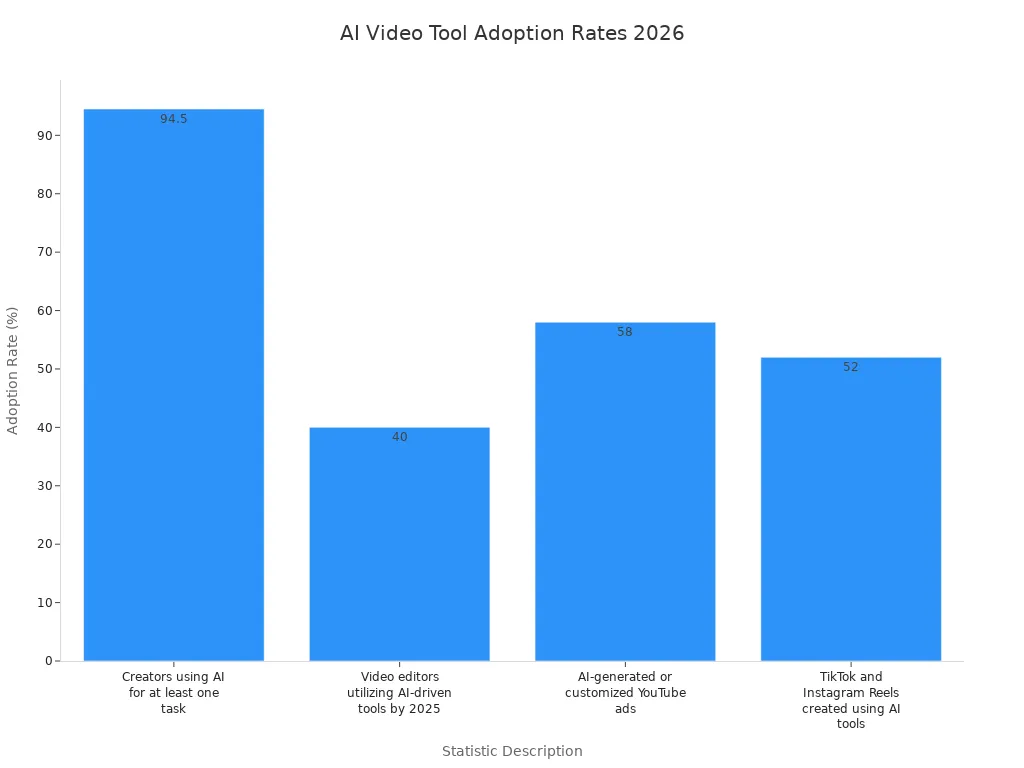
AI video tools use smart tech to help you make videos fast. They help you create, edit, and share videos easily. You can make your videos better with tools like Google Veo, Runway, Sora, Luma Dream Machine, LTX Studio, Adobe Firefly, Descript, Wondershare Filmora, VEED, Capsule, Eddie AI, OpusClip, invideo AI, Vyond, Synthesia, Live Avatar by HeyGen, revid.ai, Pictory, Elai.io, and D-ID. These ai video tools save you time and make things simple. They help you get past hard tech problems. Your videos will look professional. You want great ai, top results, easy steps, cool things to try, and good prices. Look at how 94.5% of creators now use ai video tools for at least one job:
Statistic Description | Percentage |
|---|---|
Creators using AI for at least one task | 94.5% |
Video editors utilizing AI-driven tools by 2025 | 40% |
AI-generated or customized YouTube ads | 58% |
TikTok and Instagram Reels created using AI tools | 52% |
You can look at these ai video tools and choose the best one for you.
Key Takeaways
AI video tools help make videos quickly and easily. They let creators make good videos without much trouble. These tools do boring jobs for you. This gives you more time to be creative and tell stories. You also save time. Many AI video tools have cool things like text-to-video and smart editing. Some let you work with others at the same time. These features make your work better. Pick the AI video tool that fits what you need. You might need it for social media, marketing, or training videos. Try different tools to see which one you like best. Use free trials to check out what each tool can do.
Why Use AI Video Tools
Market Trends
You see ai video tools everywhere now. In 2026, these tools have changed how you make videos for social media, marketing, and business. You can use ai to create high-quality videos that look like they came from a big studio. Many brands use ai for product demos and save up to 80% on production costs. You do not need a full crew anymore. You can pick from different platforms, like cinematic text-to-video generators, ai avatar tools, or all-in-one ai video creation suites. These options help you match your workflow to your goals.
Benefits for Creators
You want to make videos faster and easier. Ai video tools help you do that. Here are some reasons why you should use them:
Automate boring tasks and save time on video production.
Personalize videos for each viewer using smart data.
Make high-quality videos even if you do not know much about editing.
Translate your videos and add captions for a global audience.
Try new ideas and test what works best for your content.
Lower your costs and keep your marketing budget in check.
Work with your team in real time and share feedback quickly.
Benefit | Description |
|---|---|
Efficiency | You can make videos fast without special skills. |
Cost Savings | You spend less, sometimes as low as $0.50 per minute. |
Time Savings | You save up to 14 hours per video, which means more time for other projects. |
Enhanced Personalization | You reach more people with videos made just for them. |
Improved Collaboration | You use music and effects libraries to boost your creative workflow. |
Selection Criteria
When you choose ai video tools, look for these features:
Easy steps for making videos.
High-quality output for social media and marketing.
Customization for your brand and content style.
Affordable pricing for your budget.
Support for different languages and captions.
Tools that fit your workflow and help you scale your video production.
You want tools that help you create videos for any platform, from social media to marketing campaigns. The right ai video tools make your content stand out and help you grow as a creator or marketer.
AI Video Tools Overview
Comparison Table
You want to pick the best video tool for your work. This table lets you look at the top 20 ai video tools for creators. You can check their main features, prices, and what they are best at. It helps you choose the right tool for your needs. These tools work for social media, marketing, or making high-quality videos. Some tools are for ai video creation suites. Others help you edit or reuse videos for different platforms.
Tip: Check the features and prices before picking a tool. Think about what you need and how each tool fits your work.
Tool Name | Key Features | Pricing | Best For |
|---|---|---|---|
Google Veo | Text-to-video, high-quality output | Custom | Social media, ads |
Runway | Video editing, ai effects | From $12/mo | Content creators, editors |
Sora | Realistic video generation | Invite only | High-quality video production |
Luma Dream Machine | 3D video, ai animation | Free/Paid | Animation, social content |
LTX Studio | Storyboarding, ai video creation | Custom | Media teams, marketers |
Adobe Firefly | Creative ai tools, templates | From $20/mo | Social media, design |
Descript | Video editing, transcription | From $15/mo | Podcasts, social videos |
Wondershare Filmora | Easy editing, ai effects | From $49.99/yr | Beginners, social media |
VEED | Online editor, captions | From $18/mo | Social content, marketing |
Capsule | Team workflow, ai templates | Custom | Agencies, teams |
Eddie AI | Video summaries, ai repurposing | From $19/mo | Social media, short videos |
OpusClip | Clip creation, ai highlights | From $19/mo | Repurposing, social platforms |
invideo AI | Templates, ai video creation | From $25/mo | Marketing, social media |
Vyond | Animated videos, ai avatars | From $49/mo | Explainers, business content |
Synthesia | Ai avatars, multi-language | From $22/mo | Training, global content |
Live Avatar by HeyGen | Real-time avatars, ai voices | From $29/mo | Live video, social media |
revid.ai | Batch video, ai editing | From $15/mo | Agencies, bulk content |
Pictory | Script-to-video, ai summaries | From $23/mo | Social media, blogs |
Elai.io | Ai presenters, video translation | From $29/mo | Global content, training |
D-ID | Talking avatars, ai animation | From $5.99/mo | Social media, explainer videos |
This table helps you compare video tools and find what works best for you. Each tool has special features for different kinds of videos. Some tools focus on high-quality videos for social media. Others help you make videos quickly. Try a few tools to see which one fits your style and workflow.
AI Video Generators
You want your videos to be special. AI video generators help you do this. These tools use smart tech to turn your ideas into great videos. You can make clips for social media, ads, or even whole stories. Every generator has its own features for different needs. Let’s check out the top ai video generators and see how they can help your work.
Google Veo
Google Veo is a strong ai video generator. You can type what you want and get cool videos. Veo does more than just make pictures.
Veo 3.1 can make sound at the same time as video. It adds voices, sound effects, and background noise that match the video. This means you do not need to make sound by itself. Other video generators do not do this. Veo saves you time and makes your work easier.
You do not have to add sound later. Veo gives you a video with sound that fits every part. This helps you finish videos faster and makes your work smoother. You can use Veo for social media, ads, or any project that needs good video. If you want a tool that does both video and sound, Veo is a good pick.
Runway
Runway is liked by creators who want control and good results. This ai video generator gives you pro tools but is still easy to use. You get motion brushes, controls for movement, and a timeline editor. These tools let you change every part of your video.
Runway makes videos that look like movies. You can keep your style and brand in every video. Many people like Runway because it keeps characters looking the same. Your characters will not change from shot to shot, which is good for stories.
Runway's Gen-4 and Gen-4.5 models got the best scores in tests against Google and OpenAI.
It is picked as the best by many experts in 2026.
The character model is the most trusted for keeping characters the same in many shots.
You can use Runway for social media, ads, or short films. If you want a tool that gives you control and great videos, Runway is a top choice.
Sora
Sora is an ai video generator with smart tech for your videos. You can make videos with hard scenes, lots of people, and cool backgrounds. Sora uses smart models to keep your videos clear and real.
Here is what makes Sora special:
Feature | Description |
|---|---|
Advanced AI Integration | |
Versatility and Quality | Makes many types of videos with good quality. |
Realistic Motion and Scene Complexity | Handles hard scenes with many people and detailed backgrounds. |
Ethical and Safety Measures | Has rules and works with experts to keep ai safe. |
You can trust Sora for good videos. It works for social media, ads, and creative work. If you want a tool that does hard scenes and keeps things safe, Sora is a strong pick.
Luma Dream Machine
Luma Dream Machine is a smart ai video generator for creators who want more. You can mix videos, pictures, sound, and words. Luma uses code to put everything together. This helps you make complex videos easily.
Check out these features:
Feature | Description |
|---|---|
Programmatic Video Editing | Mix videos, pictures, sound, and words using code. |
Cinematic Transitions | Add cool changes between clips like fades and wipes. |
Quality Assessment | AI checks how good your video looks and moves. |
Action Adherence | Checks if something really happened in the video. |
Brand Compliance | Checks if your video follows brand rules. |
Consistency Checks | Makes sure characters and style stay the same. |
Visual Timing Analysis | Finds big moments and changes in the video. |
Audio Timing Analysis | Finds beats, words, and quiet parts in the sound. |
Luma Dream Machine helps you keep your videos on brand and the same style. You can use it for social media, ads, or any project that needs careful editing. If you want a tool that checks your work and helps you get better, Luma is a great choice.
LTX Studio
LTX Studio is an ai video generator that lets you change a lot. You can make characters and use them in many scenes. This keeps your videos looking pro and the same. LTX Studio lets you fix every part after you make your video.
Here is what you get:
Feature | Description |
|---|---|
Customizable characters | You can make characters by picking how they look, dress, and feel. You can use them in many scenes. This keeps your story and look the same. |
Scene generation and editing | After you make a video, you can change details—like speed, pictures, words, or changes between scenes. This makes your video look special and pro. It is good for people who want more control than just simple tools. |
You can make characters for your story, like a chef with a rat in his hat.
You can use LTX Studio for social media, ads, or stories. If you want a tool that lets you change everything, LTX Studio is a smart pick.
Adobe Firefly
Adobe Firefly is part of the Adobe group, so it works well with other Adobe tools. This ai video generator helps you fix and stretch clips without filming again. You can keep your work the same on all your devices, which makes things easy.
Here is how Firefly helps you:
Feature | Description |
|---|---|
Generative Extend | Lets you stretch clips a little without filming again. This helps fix bad edits. |
Creative Cloud Sync | Keeps your work the same on all devices, making things easy. |
You can use Firefly for social media, ads, or any creative project. If you already use Adobe, Firefly fits right in. It helps you make good videos and keeps your work simple.
You have lots of choices for ai video generators. Each one has special features for different videos. You can pick a tool that fits your style, your work, and your way of making videos. Try these tools and see how they help you. Making good videos is now easier than ever.
AI Video Editors
You want your video editing to feel easy and fast. AI video editors help you do just that. These tools use smart technology to make your workflow smoother. You can create, edit, and share videos for social media, marketing, or any project. Let’s look at the top ai video editors and see how they can help you make better content.
Descript
Descript stands out as one of the most popular ai video editors for creators. You can edit your video by editing text, just like you would in a document. This makes video editing simple, even if you are new to it.
Descript’s AI transcription stands out as one of its most practical features, delivering fast and accurate transcripts that save hours of manual effort.
You can use Descript for podcasts, social media clips, or business content. The AI transcription feature lets you turn spoken words into text in seconds. You do not have to type everything by hand. You can cut, copy, and paste parts of your video by changing the text. This saves you time and helps you finish projects faster.
Here are some of the best features you get with Descript:
Text-Based Editing lets you change your video by editing words.
Overdub (AI Voice Cloning) helps you fix mistakes without re-recording.
Studio Sound makes your audio sound clear and professional.
Multitrack Editing gives you control over many layers of video and sound.
Screen Recording is great for tutorials or demos.
Collaboration Tools let your team work together in real time.
Automatic Captions & Transcriptions make your content easy to watch and share.
Descript’s AI tools help you work faster and make your content look professional. You can use it for social media, marketing, or any video project.
Wondershare Filmora
Wondershare Filmora is a favorite for beginners who want to make good videos without stress. The ai features help you create content that looks sharp and fun. You do not need to be a pro to use this tool.
Some of the top features include:
Beat Detection marks music beats on your timeline. You can sync your video cuts with music easily.
Motion Tracking lets you attach text or images to moving objects in your video. This adds a creative touch.
Auto Synchronization matches your audio and video files. You do not have to line them up by hand.
Filmora’s ai video editing tools help you make content for social media, YouTube, or school projects. You can add effects, transitions, and captions with just a few clicks. The interface is simple, so you can focus on your story, not the tech.
VEED
VEED is an online ai video editor that works right in your browser. You do not need to download anything. You can make videos for social media, marketing, or business in minutes. VEED gives you many features for editing, captions, and branding.
Here is a quick look at VEED’s pricing and features:
Monthly Cost | Features | |
|---|---|---|
Lite | $19/editor | Watermark-free 1080p exports, 12 hrs/month of auto-subtitles, stock media access, simple branding tools, up to 5 Gen-AI videos per day |
Pro | $49/editor | AI tools, 4K exports, subtitle downloads, translations (20 min/month), full brand kits, AI avatars (20 min/month), unlimited Gen-AI video creation |
Enterprise | Custom pricing | Everything in Pro plus team management, custom templates, advanced security, multiple brand kits, priority support, video analytics |
Free | $0/month | Watermark, 720p, 10-min max |
You can use VEED to add subtitles, translate your content, and use ai avatars. The platform supports high-quality exports and gives you tools for branding. VEED is great for teams and solo creators who want to make videos for social media or marketing.
Capsule
Capsule uses ai to make video editing easy for everyone. You can add text, graphics, and music with just a few clicks. Capsule gives you pre-made design elements, so your videos look polished.
Capsule’s ai features help you:
Remove gaps in your footage automatically.
Suggest soundtracks that fit your video.
Improve audio quality without extra work.
Capsule is perfect for social media content, team projects, or quick edits. You do not need to worry about the small stuff. The ai takes care of it, so you can focus on your story.
Eddie AI
Eddie AI is a smart tool for creators who want to repurpose content. You can turn long videos into short clips for social media. Eddie AI finds the best moments in your video and makes them stand out.
You can use Eddie AI to:
Summarize long videos into short, shareable clips.
Add captions and effects with ai.
Create content for TikTok, Instagram, or YouTube Shorts.
Eddie AI helps you save time and reach more people. You do not have to watch your whole video to find highlights. The ai does it for you.
OpusClip
OpusClip is a powerful ai video editor for making short-form content. You can turn long videos into viral clips for social media. OpusClip uses smart technology to find the best parts of your video.
Here’s what OpusClip can do for you:
Automates the generation of short-form videos by analyzing audio, visuals, and dialogue.
Identifies engaging moments and clips them for social media platforms.
Detects hooks, punchlines, and high-value segments with precision.
Handles aspect ratio conversion to keep your clips looking professional.
Adds animated captions and brand kits to enhance your content.
Scores each clip based on its potential to go viral.
OpusClip looks at spoken words, visual cues, sound, and emotion to find highlight-worthy moments. It cuts these moments into short clips and adds animated captions. The platform reframes videos for vertical formats, perfect for TikTok and Instagram. Each clip gets a 'virality score' to help you pick the best ones for posting.
Tip: If you want to grow on social media, use OpusClip to turn your long videos into short, catchy clips.
You have many choices when it comes to ai video editors. Each tool offers unique features to help you create, edit, and share high-quality content. Whether you want to make videos for social media, marketing, or personal projects, these editors give you the power to work faster and smarter. Try them out and see which one fits your style best.
AI Video Marketing Tools
If you want your videos to do well, you need good ai video marketing tools. These tools help you make, fix, and share videos that get noticed online. You can save time and reach more people with less work. Let’s check out some top ai video marketing tools and see how their features help you grow your content.
invideo AI
invideo AI makes making videos easy. You type your idea, and the tool builds a video draft for you. It writes the script, picks pictures and clips, adds voices, and makes slideshows. You get design tips while you work, so your video always looks nice.
Core Feature | Description |
|---|---|
AI-Powered Idea-to-Video Generation | Makes a full video draft from your idea. |
Intelligent Script Generation | Writes a script for your video. |
Vast Stock Media Integration | Lets you use over 16 million stock assets. |
You can change your video by editing text with simple commands. The tool gives you realistic AI voiceovers in many languages. You can also change pictures and timing after your draft is ready. These features make invideo AI one of the best ai video marketing tools for social media and business.
Vyond
Vyond helps you tell your brand story in style. You can use your brand colors, bring in your own fonts, and add logos that move with your characters. The tool lets you make special characters and props that match your brand.
Feature | Description |
|---|---|
Custom Color Palette | Keep your brand colors in every video. |
Font Import | Use your own fonts for your brand. |
Brand Kit | Share brand stuff with your team. |
Company Watermark | Protect your videos with your logo. |
You can manage approvals and make sure every video follows your brand rules. Vyond is great for businesses that want their video marketing tools to look good and stay on-brand.
Synthesia
Synthesia helps you make videos for people all over the world. You can translate your video into seven languages with one click. The tool also changes all text in your video, so nothing is left out. You can use AI avatars and media to make your content more fun.
Synthesia’s video player lets viewers watch in their own language. This helps you reach people everywhere. If you want to grow your video marketing tools for global content, Synthesia is a smart pick.
Live Avatar by HeyGen
Live Avatar by HeyGen makes your video marketing tools feel alive. You can make avatars that talk and move in real time. The tool uses WebRTC for smooth video and sound. You only need a two-minute video to train your avatar.
Feature | Description |
|---|---|
Real-time interaction | Avatars answer users right away. |
Natural expressions | Avatars show real lip-sync and gestures. |
Customization | Use your own language models for smart replies. |
These features help you make videos that feel personal and real. Live Avatar by HeyGen is good for social media, customer support, and interactive content.
Pictory
Pictory makes video creation easy for everyone. You can turn text, pictures, or blog posts into videos. The tool adds subtitles, captions, and transcriptions by itself. You get templates for social media, product promos, and education.
You can use the audio-to-text option to help users who cannot see well.
The script-to-video feature lets you make videos from written content.
Pictory’s AI voice generator helps you make faceless videos with high quality.
If you want to automate your video marketing tools and keep your content new, Pictory is a great choice.
Tip: Try these ai video marketing tools to make your videos faster, better, and ready for any social or media platform.
Specialized AI Video Tools
Elai.io
You want to make a lot of video content for your business. Elai.io helps you do that fast. You can turn text into video with ai. The platform gives you tools to make high-quality, interactive videos with digital avatars. You can scale your video production and reach global audiences. Elai.io lets you add interactive elements and localize your video for different languages. You get options to create ai digital twins and use voice cloning in 28 languages. These features help you keep your video content fresh and flexible for any market.
Make videos from text with ai
Use digital avatars for your brand
Add interactive elements to your video
Localize for global media
Clone voices for different languages
Scale video production for your team
D-ID
D-ID uses ai to turn photos into talking head videos. You can make a video from text or audio. The tool animates faces and syncs lips to voices. You get natural presentations for your content. D-ID works for explainers, marketing, and personalized media. The platform focuses on ethical use to stop deepfake misuse.
Feature | Description |
|---|---|
Photo animation | Turns images into talking portraits with real facial movements and lip-syncing. |
Voice customization | Lets you pair animated portraits with different ai voices for a natural video. |
Multiple use cases | Works for explainers, marketing, and personal video content. |
Ethical use focus | Promotes safe and responsible use of ai video technology. |
Colossyan
Colossyan helps you make ai videos with avatars for training, onboarding, and education. You can pick from many avatars and voices. The tool lets you translate your video into different languages. You can add your logo and brand colors. Colossyan makes it easy to create high-quality video content for your team or clients.
Simplified
Simplified gives you an all-in-one platform for video creation. You can use ai to write scripts, edit clips, and add captions. The tool has templates for social media and marketing. You can work with your team and share feedback in real time. Simplified helps you keep your video content on brand and ready for any platform.
Repurpose
Repurpose lets you turn one video into many pieces of content. You can cut long videos into short clips for social media. The tool helps you post your video on different media platforms without extra work. Repurpose saves you time and helps you reach more people with your video content.
FlexClip
FlexClip is a simple tool for making quick videos. You can use ai to add text, music, and effects. The platform gives you templates for social media, ads, and business. FlexClip helps you make high-quality video content without stress.
CapCut
CapCut is popular for editing social media videos. You can use ai to add effects, captions, and music. The tool works well for TikTok, Instagram, and YouTube. CapCut gives you easy controls and high-quality exports. You can make your video stand out on any media platform.
Biteable
Biteable helps you make fun and engaging videos. You can use ai templates for explainer videos, ads, and social posts. The tool gives you a big library of stock footage and music. Biteable makes it easy to create video content that grabs attention.
Promo
Promo is great for making marketing videos. You can use ai to create ads, promos, and social media clips. The tool offers templates, stock footage, and music. Promo helps you make high-quality video content for your brand.
Clideo
Clideo is an online tool for quick video edits. You can cut, merge, and compress videos with ai. The platform works in your browser. Clideo is perfect for fast social media content and simple video tasks.
Vmake
Vmake gives you ai tools for video creation and editing. You can use templates, add effects, and export in high quality. The tool works for social media, ads, and business content. Vmake helps you finish your video projects fast.
Jitter
Jitter lets you animate text and graphics for your videos. You can use ai to create motion graphics for social media. The tool is simple and works in your browser. Jitter helps you add style to your video content.
Clip Creator
Clip Creator helps you turn long videos into short clips. You can use ai to find the best moments. The tool makes it easy to share your video on social media. Clip Creator saves you time and boosts your content reach.
Tip: Try these specialized ai video tools to make your video content stand out on any social media platform. You can find the right features for your workflow and boost your video quality with less effort.
Choosing AI Video Tools
Assessing Needs
You want the right ai video tool for your work. Start by thinking about your goals. Do you want to make social media clips, marketing videos, or training content? Each project needs different features. Some tools help you make quick videos for social platforms. Others focus on high-quality output for business or creators. Write down what you need most. This helps you pick a tool that matches your style and workflow.
Here’s a table to help you match ai video tools to your business goals:
Factor | Description |
|---|---|
Functionality | Look for features like text-to-video, multimodal ai, and ways to personalize your content. |
User Interface | Choose tools that are easy to use and help your team work together. |
Output Quality | Check for sharp visuals, clear audio, and options to customize your video. |
Pricing & Scale | Pick a plan that fits your budget and lets you grow your content as your needs change. |
Comparing Features
Now, compare the features of each ai video tool. Make a list of what matters most for your content. Do you need fast editing, social media templates, or advanced ai effects? Some tools offer better quality for media posts. Others give you more control over branding or captions. Try to match the features with your daily tasks. This makes your video creation smoother and helps you get better results.
Tip: Use free trials to test features before you pay. You can see if the tool fits your workflow and meets your quality needs.
Practical Tips
You can make the most of ai video tools with a few smart steps:
Start with one tool and learn its features well.
Test your video on different social media platforms to check quality.
Ask your team or other creators for feedback on your content.
Save your favorite templates and settings for faster editing.
Keep an eye on updates—ai tools add new features often.
If you try these steps, you will find the best ai video tool for your content. You will save time, boost your quality, and reach more people on social media and other media channels.
AI Video Tools: Recommendations
Key Takeaways
You have many options for making great video with ai. These tools help you create content for social media, marketing, and business. You can use ai to save time and boost your video quality. Each tool has special features that make your work easier. Some tools help you edit fast. Others let you turn text into video or add cool effects. You can find tools that fit your style and help you stand out on any media platform.
Here’s a quick list of what you get with top ai video tools:
Fast video creation for social media and business
Smart features for editing, captions, and effects
High-quality output for all your content
Easy ways to share video on different media
Tools that help creators grow and reach more people
Tip: Try different ai tools to see which features help your content shine. You can mix tools for the best results.
Next Steps
You can start by picking one ai video tool that matches your needs. Look at the features and see if they fit your content goals. Use free trials to test video quality and workflow. Ask other creators for tips on using ai for social media and media projects. Save your favorite settings to make video editing faster next time.
Here’s a simple plan to get started:
Write down what you want from your video content.
Pick one ai tool with the features you need.
Test the tool with a short social video.
Check the quality and see if it fits your media style.
Try another tool if you want more features or better results.
You can use ai to make video creation fun and easy. With the right tools, your content will look sharp and reach more people on every social media platform.
You can see how ai video tools change the way you create. These tools help you make video content faster and easier. You get smart ai features that boost your video quality. You can try different ai video tools to find what works best. Make a list of your needs before you pick an ai video tool. Test free trials to see how each ai video tool fits your workflow. Stay updated because ai video tools keep getting better. You can use ai to make every video stand out. Start now and let ai help you grow your video skills.
FAQ
What are AI video tools?
AI video tools use smart technology to help you create, edit, or enhance videos. You can make videos faster, add captions, or even turn text into video. These tools work for social media, marketing, and business content.
Can I use AI video tools if I am a beginner?
Yes! Most AI video tools have simple steps and easy interfaces. You do not need special skills. You can start making videos right away and learn as you go.
How do AI video tools save me time?
You can automate editing, add captions, and create clips with just a few clicks. AI finds the best moments and helps you finish videos faster. You spend less time on boring tasks.
Are AI video tools expensive?
You can find free AI video tools or paid plans. Prices start as low as $5.99 per month. Many tools offer free trials, so you can test features before you pay.
Can I use AI video tools for different platforms?
Yes, you can! AI video tools let you make videos for TikTok, Instagram, YouTube, and more. You can change the size, style, and captions to fit each platform.
See Also
Steps To Develop Engaging AI Video Advertisements
AI Tools For Effective Video Marketing Strategies
Three Methods AI Video Creators Simplify Video Production