Seedance 2 vs other AI video tools

You want an ai tool that lets you control your videos. seedance 2.0 is special because you can decide how your materials change the video. This helps your brand style stay the same in all your videos. You can add to old videos and keep them smooth. If you care about sound, seedance lets you pick styles for each video. You also get clear details, so your product looks good everywhere. But, seedance 2.0 costs more than simple tools. If you need better editing or real-looking videos, seedance 2 gives you great choices.
Key Takeaways
Seedance 2.0 gives you great control over editing videos. You can keep your brand the same in many projects. The platform lets you use text, images, and audio as inputs. This helps you make special videos. Seedance 2.0 is very good at matching sound and video together. This is great for projects that need sound and visuals to match well. Seedance 2.0 costs more than simple tools. But its advanced features make it worth the price for top-quality videos. If you need fast changes or very real videos, try other tools like Sora 2 or Kling 3.0. These might fit your needs better.
Seedance 2.0 Overview
Features Snapshot
If you want your videos to be special, look at what seedance 2.0 can do. You can use quad-modal input to mix up to 12 assets in one video. The universal reference system lets you upload videos to guide style and camera moves. It keeps faces, clothes, and scenes the same in every shot. You can swap characters, make clips longer, and blend videos with smart editing. Audio and visuals match up, so everything looks and sounds smooth. Motion looks real, and the resolution is sharp. You also get IP protections and watermarking for safety.
Quad-modal input helps you use many assets together.
Universal reference system lets you control style and timing.
Faces, clothes, and scenes stay the same.
Smart editing tools let you swap characters and join clips.
Audio and visuals match for smooth videos.
Motion looks real and details are sharp.
Watermarking keeps your work safe.
Advantages
Seedance 2 gives you more control than most ai video tools. You can use reference clips to guide how your videos look and feel. Your brand style stays the same, even if you make many videos. Seedance 2.0 works fast, so you do not have to wait long. You can use it in CapCut and Dreamina to reach more people. If you need videos in other languages, seedance 2.0 supports that. You get strong editing tools to change characters or make scenes longer without losing quality.
Tip: If you want to make lots of videos, seedance 2.0 helps you keep them all looking good and professional.
Limitations
Seedance 2.0 costs more than basic ai video tools. You may need to learn how to use all the editing tools. Sometimes, you need good assets to get the best results. If you want simple videos, seedance 2 might be too much. You may not get every feature unless you pay for a subscription.
Limitation | Impact on Users |
|---|---|
Higher pricing | Not good for small budgets |
Learning curve | Takes time to learn |
Asset quality | Needs good materials |
Advanced tools | Might be too hard |
Subscription model | Not all features are free |
Seedance 2.0 is different from other ai video tools. You get more control, strong editing, and high-quality videos. If you want videos that match your brand and reach more people, seedance 2 has what you need.
AI Video Generation Comparison
When you look at ai video generation, you want to know how each tool stacks up. This comparison will help you see where seedance 2, Sora 2, Kling 3.0, and other video generation models shine or fall short. Let’s break it down step by step.
Input Options
You get the most flexibility with seedance 2.0. It lets you mix text, images, videos, and audio all in one project. You can use up to 9 images, 3 videos, and 3 audio files at once. This means you can guide every part of your video. Sora 2 and Kling 3.0 don’t give you this much control. They mostly stick to text and a single image.
Here’s a quick look at how the input options compare:
Model | Text | Images | Videos | Audio |
|---|---|---|---|---|
Seedance 2.0 | Yes | Up to 9 | Up to 3 | Up to 3 |
Kling 3.0 | Yes | 1-2 | No | No |
Sora 2 | Yes | 1 | No | No |
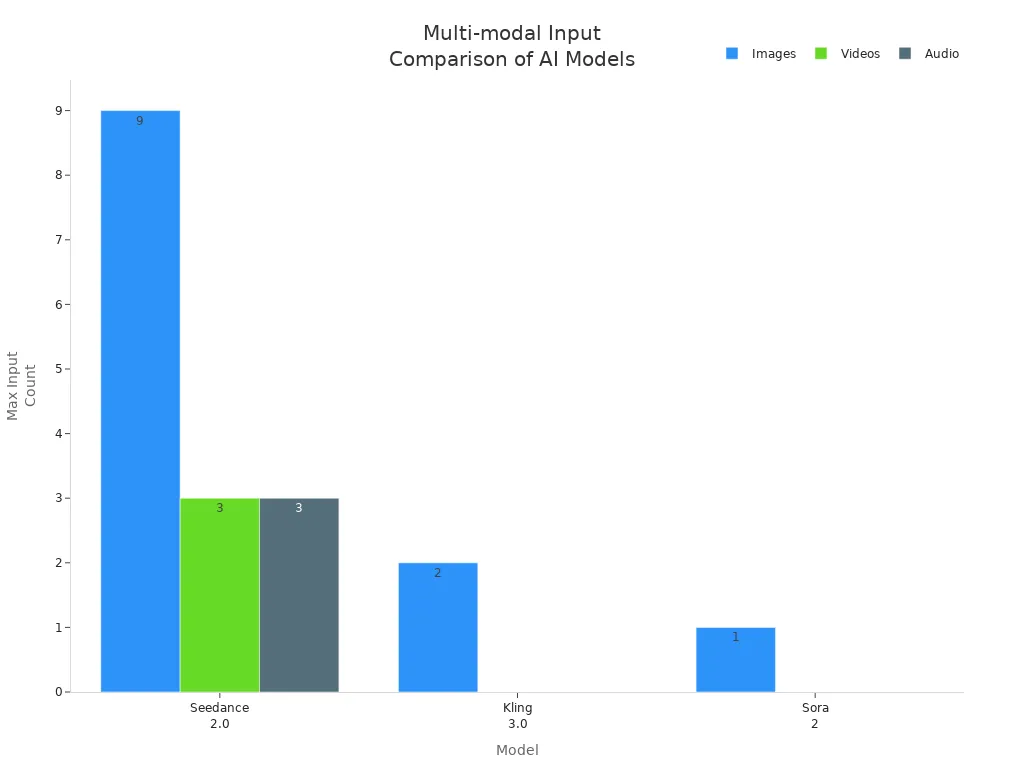
Most other ai video generation models only let you use one type of input at a time. Some tools just take text, while others only work with images or need you to upload a video to edit. Seedance 2.0 stands out because you can blend all these inputs and decide how each one shapes your final video.
Text-to-video generators: Only use text prompts.
Image-to-video tools: Turn still images into moving scenes.
Video editing ai: Need a video to start with.
Multi-modal video generators: Accept more than one input, but usually with less control than seedance 2.
Output Quality
You want your videos to look sharp and move smoothly. In this comparison, seedance 2.0 gives you strong creative control and sharp details. Kling 3.0 leads in motion quality, while Sora 2 wins for realistic physics and long, smooth takes. Seedance 2.0’s audio sync and multi-language lip-sync are top-notch, but its face consistency sometimes drops because of strict moderation.
Here’s a table to help you see the differences:
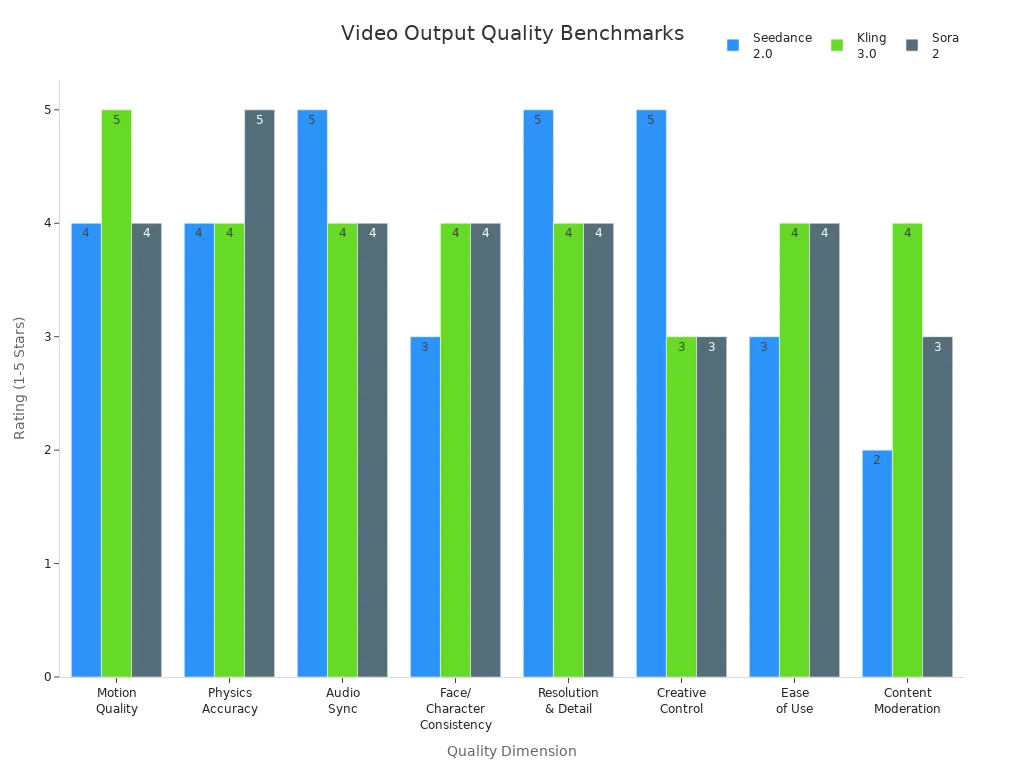
Users say seedance 2.0 looks great for short, cinematic clips. The lighting and style stay steady. For longer videos, you might see small glitches, especially when things get complex. Sora 2 is the best if you want super-realistic motion and physics in long takes. Veo 3.1 is another model that makes very polished, commercial-style videos.
Speed & Efficiency
You don’t want to wait forever for your video. Seedance 2.0 works fast, but the speed depends on how many files you use. If you add lots of references, it might slow down a bit. Sora 2 is slower than Kling 3.0 and Veo 3.1. For a 10-second HD video, most models take between 2 and 10 minutes.
Seedance 2.0: Fast, but speed drops with more inputs.
Sora 2: Slower than Kling 3.0 and Veo 3.1.
Kling 3.0: One of the fastest for short clips.
If you need to make a lot of videos that all look the same, seedance 2.0 is great. It keeps your style steady across big projects. Runway Gen-4 is better if you want to try lots of ideas quickly, but it doesn’t keep things as consistent.
Audio Reference Support
Seedance 2.0 gives you more control over sound than other video generation models. You can upload your own audio files and match them to your video. Sora 2 and Veo 3.1 can make background music, but you can’t guide them as much.
Feature | Seedance 2.0 | Sora 2 |
|---|---|---|
Audio Reference Input | Yes (upload your own) | Makes music and sounds, but less control |
Control Over Audio | High (pick your own audio) | Low |
Multi-language Lip Sync | Yes (8+ languages) | Not available |
Winner | Seedance 2.0 |
Seedance 2.0 lets you process text, images, audio, and video all at once. You can upload a reference video to set camera moves and sync your audio. This makes your video and sound fit together perfectly.
Seedance 2.0: Best for matching video and audio.
Sora 2: Good audio quality, but less control.
Veo 3.1: Can add sound, but not as flexible.
Multi-language Capabilities
If you need videos in different languages, seedance 2.0 is your best bet. It supports lip-sync for more than eight languages. This helps your videos reach more people around the world. Sora 2 and Kling 3.0 don’t offer this feature yet.
Pricing Models
Pricing can make a big difference in your choice. Seedance 2.0 starts at ¥1 RMB for a 7-day basic membership, but you need a China TikTok account and Alipay. This can be hard for users outside China. Other models like Sora 2 and Kling 3.0 have different prices and are easier to access for most people.
Feature | Seedance 2.0 | Competitors |
|---|---|---|
Minimum Requirement | ¥1 RMB for 7-day Basic membership | Varies by competitor |
Account Requirement | China TikTok account | Local accounts accepted |
Payment Method | Alipay | Various payment options |
Accessibility for Non-Chinese Users | High barrier | Lower barrier |
Note: If you live outside China, you might find it tricky to sign up for seedance 2.0. Other ai video generation models are easier to join and pay for.
Final Thoughts on Comparison
Seedance 2.0 leads in input options, creative control, and audio-video matching. It’s perfect if you want to guide every detail of your video and keep your brand style steady. Sora 2 is best for super-realistic, long videos. Kling 3.0 is fast and smooth for short clips. When you look at this comparison, think about what matters most for your project—control, speed, realism, or price.
Workflow & Integration
Editing Tools
Seedance 2 gives you tools to help you work faster. You can drag images, audio, and video into your project. The no-code builder lets you set up steps without coding. This makes it simple to create and change videos. You can connect seedance 2 with Notion, Airtable, Slack, and Google Workspace. This lets you get scripts, images, or feedback from your team. You do not have to leave your workflow to do this.
Here’s a quick look at how seedance 2 matches up with other ai video tools for workflow integration:
Feature | Seedance 2.0 | Other AI Video Tools |
|---|---|---|
No-code workflow builder | Yes | Varies |
Integration with Notion | Yes | Limited |
Integration with Airtable | Yes | Limited |
Integration with Slack | Yes | Limited |
Integration with Google Workspace | Yes | Limited |
Automated content pipelines | Yes | Varies |
You can set up automated pipelines in seedance 2. This helps you make many videos fast. Most other tools do not give you this much flexibility. If you want your team to stay in sync, seedance is a big help.
Tip: Try linking seedance 2 to your favorite apps. You will save time and keep your videos organized.
API & Platform Integration
You might want to connect seedance 2 to your own apps or websites. Right now, seedance does not have a public API. This means you cannot build custom connections as easily as with some other tools. Kling 3.0 gives you a REST API with many features, like managing tasks and getting updates. With seedance, you use partner platforms to get its features. This works well for most people, but you do not get as much freedom as with a direct API.
Seedance 2 does not have a public API for custom integrations.
Kling 3.0 has a public REST API with guides.
You use seedance through partner platforms, not direct API calls.
If you want to automate every part of your video workflow, seedance 2 may feel limited. But if you use popular platforms like Notion or Slack, you will find many ways to connect and manage your projects.
Scenario Recommendations
Fast Iteration
You want to create videos quickly and test ideas without waiting. Colossyan stands out for fast iteration. You can turn PowerPoint or PDF slides into video scenes in minutes. The platform helps you keep your brand style with Brand Kits. You can manage drafts and work with your team using workspaces and folders. Descript also makes editing fast. You edit videos like you edit text, so you do not need special skills. If you need to make lots of drafts or update training videos often, these tools help you move fast.
High Realism
If you care about making your videos look as real as possible, Sora 2 and Kling 3.0 lead the way. Sora 2 gives you smooth motion and realistic physics. Kling 3.0 creates lifelike movement in short clips. These next-gen video ai models work well for ads, films, or any project where realism matters most. Seedance 2 also delivers sharp details and smooth motion, but it shines when you want creative control and style consistency.
API Integration
You may want to connect your ai video model to your own apps or workflow. Kling 3.0 offers a public REST API, so you can automate tasks and manage projects directly. Seedance 2 does not have a public API yet, but you can use it through partner platforms. This works for most users, but if you need deep automation, Kling 3.0 gives you more options.
Budget-Friendly
If you need to watch your budget, seedance 2 is a smart pick. The platform is free to use and does not need coding skills. You can create high-volume social content without spending much. Seedance 2 uses a credit-based pricing model that is expected to be cheaper than Sora 2. You do not need accounts from big providers, which helps teams with special data needs. ByteDance’s history shows that seedance often costs less than other next-gen video ai tools.
Free-to-use platform
Credit-based pricing, likely cheaper than Sora 2
No need for Google or OpenAI accounts
Advanced Editing
You want more than just basic video creation. Seedance 2 gives you a user-friendly interface and lets you give complex instructions. You can add many actions and details in one video. Motion tracking keeps transitions smooth and natural. The software follows your prompts closely, so your videos match your vision. Sora 2 and Kling 3.0 do not offer this level of editing control.
Tip: If you want to keep your brand style, work with global teams, or need pro-level editing, seedance 2 is a top choice among ai video tools.
Use Cases for Seedance
Creators
You want your videos to be special and tell a story. Seedance 2 lets you control every part of your video. Many creators use it for e-commerce product videos. These videos need smooth camera moves and music that fits well. You can keep your brand style the same in all your videos. This helps people remember you. Here are some ways creators use seedance for storytelling:
Make product videos that show details and keep your brand strong.
Mix music and visuals for a smooth story.
Use different assets to make new scenes and keep things fresh.
Keep faces and styles the same in every video.
Try new ideas fast and see what your audience likes.
Tip: If you want fans who stick with you, tell stories that feel real and match your brand.
Businesses
You can use seedance 2 to help with marketing and talking to your team. Storytelling helps you connect with customers and coworkers. Businesses use seedance to make videos easy and quick. Here’s how different teams use it:
Performance marketers make over 20 ad videos for fast A/B testing.
E-commerce brands make lots of product videos, not just pictures.
Social media managers make videos for each platform all the time.
Corporate teams make training and work videos without a studio.
Agencies give more services without hiring more people.
Making videos for every need is simple with seedance. You save time and money, and your message stays clear.
Developers
You might want to add storytelling to your own apps. The official API for seedance 2 is coming soon. You will get access through Volcengine in China and BytePlus for other countries. NxCode has guides with setup steps, prices, and code samples in Python and JavaScript. If you work outside China, you can use EvoLink to connect to seedance. These platforms do not need a Chinese phone number and help you save money. You can add advanced storytelling to your projects without much trouble.
You have a lot of choices for AI video tools. Seedance 2.0 stands out if you want control, fast editing, and videos that match your brand. It works best for reference-heavy projects and audio-synced content. You can see how each tool fits different needs:
Tool | Best For |
|---|---|
Seedance 2.0 | Reference-heavy, audio-sync, template creation |
Kling 3.0 | Smooth motion, quick drafts, budget projects |
Sora 2 | Realistic physics, story videos, dialogue scenes |
Veo 3.1 | Broadcast quality, pro B-roll, cinema polish |
Seedance 2.0 helps you save time and money, but it only makes short clips and sometimes has small animation issues. If you want to double your video output and keep your style, Seedance 2.0 is a smart pick.
FAQ
How does Seedance 2.0 compare to other AI video tools?
You get a clear feature comparison with Seedance 2.0. It stands out for smart video editing and flexible input options. You can control your video storytelling better than most text-to-video platforms.
Can I use Seedance 2.0 for high output resolution?
Yes, you can create videos with sharp output resolution. Seedance 2.0 keeps details clear and motion smooth. You will notice the difference when you watch your finished clips.
What are the key advantages of Seedance 2.0?
You gain more control over style and assets. Seedance 2.0 supports real production workflows and lets you blend multiple inputs. You can keep your brand consistent in every video.
Does Seedance 2.0 support smart video editing?
Seedance 2.0 gives you smart video editing tools. You can swap characters, extend scenes, and match audio easily. The platform helps you make changes without losing quality.
Is Seedance 2.0 good for text-to-video projects?
You can use Seedance 2.0 for text-to-video tasks. The platform lets you mix text, images, and audio. You will find it easy to guide your video storytelling and reach high output resolution.
See Also
Discover The Magic Of Seedance 2 Video Creation
Comparing Features And Performance Of Seedance 2 And Kling AI
Effortlessly Create Stunning Videos With Seedance 2 In 2026