What You Need to Know About Seedance 2.0 in 2026

Seedance 2 grabs your attention in 2026, and this Seedance 2 review 2026 shows why. The video quality is movie-like, with crystal-clear details and smooth motion. Take a look at this table to see what makes Seedance 2 stand out:
Feature | Description |
|---|---|
High-Quality Video | Movie-level 1080p, realistic gravity, fabric movement |
Consistency | Faces and clothing remain consistent |
Audio Generation | Authentic speech and sound effects |
Complex Shots | Advanced camera movements |
Multi-Shot Storytelling | Seamless scene transitions |
Rapid Prototyping | Create scenes in just minutes |
Seedance 2 lets you produce video scenes that once required a large team. Solo creators and concept artists benefit the most. Expect a Seedance 2 review 2026 with real video demonstrations.
Key Takeaways
Seedance 2.0 helps you make great videos. The videos look like movies and move smoothly. This is good for people who work alone and for concept artists.
The tool lets you use different things together. You can mix text, pictures, sounds, and videos. This gives you more ways to be creative in your projects.
It has auto-storyboarding and matches sound with video by itself. Seedance makes making videos easier. You can spend more time telling your story.
What Is Seedance 2.0?
Seedance 2.0 changes how you make ai videos. This tool lets you control every part of your video. Your videos can look and feel real. You can use seedance for quick ideas or full storyboards. The ai video model in seedance helps you make high-quality videos. You get smooth movement, real-looking textures, and characters that stay the same. If you want your videos to be special, seedance is a great choice.
Multimodal Video Generation
Seedance does more than just turn text into video. You can use images, audio, and even other videos to help make your ai video. This multimodal ai video generator lets you talk about scenes in normal words, upload a video, or start with a picture. You can make scenes move with your own ideas about camera moves and lighting.
Seedance 2 is different because it uses many types of input. Most text-to-video generators only use words, but seedance lets you use images, videos, audio, and text. You can describe anything with normal language. This kind of motion control is hard to find on other platforms.
You can upload a video and change it but keep how things move.
You can make a picture move by giving clear instructions.
You can make video and audio at the same time, so you do not need extra editing.
Key Features in 2026
Seedance has new features that make ai video creation easier and stronger. Check out this table to see what makes seedance cool:
Feature | Description | Impact on User Experience |
|---|---|---|
Auto-Storyboarding & Camera Control | Makes storyboards and camera moves for you from a short idea. | Makes video creation simple, so you can focus on your story. |
Multi-Modal Mastery | Lets you use up to 12 files for better control of your video. | Gives you more ways to be creative and exact in your videos. |
Makes sound effects and matches lips to speech. | Saves time because you do not need other tools. | |
Multi-Shot Narrative Consistency | Keeps characters and scenes the same in every shot. | Makes your story feel real and smooth. |
Seedance also makes movement steady and videos look nice. Your videos can follow real physics, like figure skating, without mistakes. The tool listens to hard instructions and lets you control every part. If you use ai to make videos, seedance helps you make videos that look good and stay the same. You can use seedance for making, creating, and telling stories with video. This tool makes ai video making easy and something you can trust.
Seedance 2 Review 2026
Setup and First Impressions
You want to start making videos with seedance. The setup is fast and easy. First, you download LagoFast by clicking the Free Trial button. After you install it, you search for seedance 2.0 and pick it. Next, you press the Boost button to speed things up. When you connect, you use the Seedance 2.0 Access Tool.
If you like Dreamina, you go to their website. You sign up or log in. You click AI Video in the menu and choose seedance 2.0. You pick Single-Frame Mode or Multiframes Mode. You upload your materials and write your prompt with the @ reference system.
Here’s a simple checklist for your first try:
Download LagoFast and install it.
Search for seedance 2.0 and pick it.
Start acceleration and connect.
Use the tool to access seedance 2.0.
Sign up or log in on Dreamina’s website.
Pick your video mode.
Upload your assets and write your prompt.
You see right away that seedance has a clean interface. Menus are easy to find. You do not waste time looking for features. Your first review feels good. You see clear instructions and helpful tips. You can start your first video test in just a few minutes.
Performance and Motion Stability
You want your videos to look smooth and real. Seedance does this well. In your review, you see faces and clothes stay the same in every frame. There is no character drift, which happens in other AI video tools. Your review shows seedance is better than Kling 2.1 and old Runway models.
You check performance scores and see seedance is stable. The model keeps faces, clothes, and styles steady in your video. You notice seedance handles hands and motion better than Google Veo 3.1. Your review shows seedance gives you more control over camera moves and style.
Here’s a table comparing seedance and Sora 2:
Metric | Seedance 2.0 | Sora 2 |
|---|---|---|
Edge Stability | 8/10 | 7/10 |
Motion Flow | 9/10 | 7/10 |
Style Consistency | 8/10 | 7/10 |
Face Consistency | 7/10 | 7/10 |
Camera Control | 9/10 | 7/10 |
Physics Accuracy | 7/10 | 9/10 |
Emotional Expression | 6/10 | 8/10 |
Average | 7.7 | 7.4 |
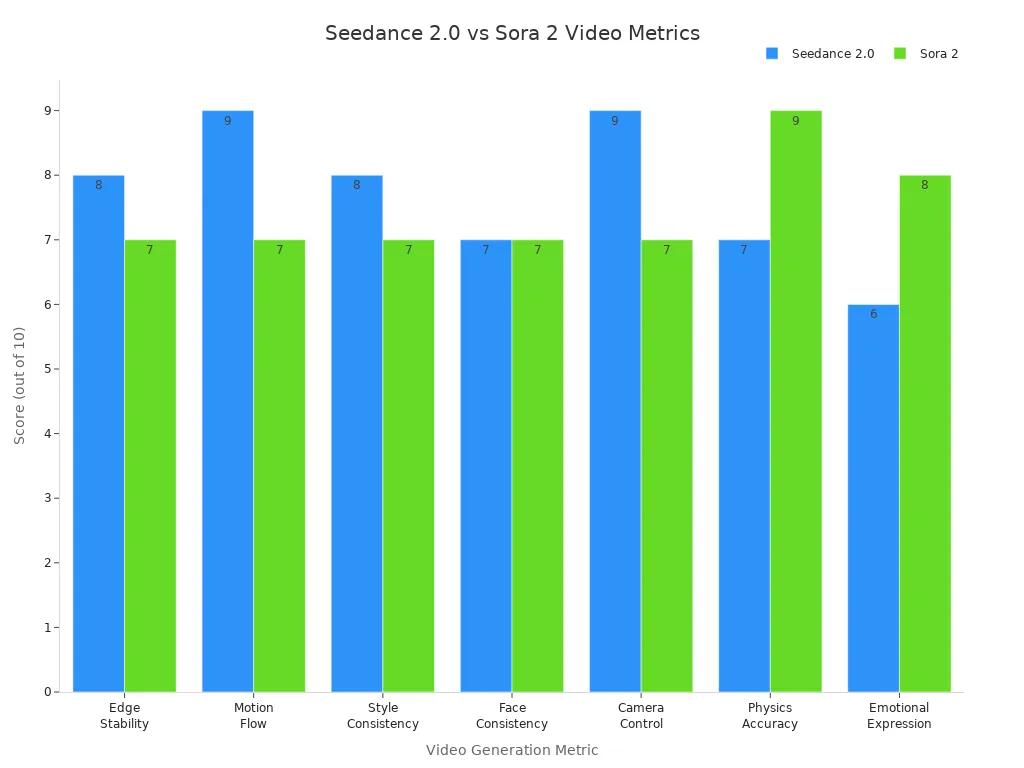
You see seedance scores higher in motion flow and camera control. Your review shows videos look more stable and professional. You can trust seedance to keep your scenes steady, even in big projects.
Tip: For best results, use layered references and clear prompts. Seedance works well with simple instructions.
Real-World Video Results
You test seedance by making different videos. You see great quality in every review. The tool shows complex actions, like cars moving through debris, without needing a big team. Your videos show real weight and gravity. Characters run, fall, and interact with their world in believable ways.
You try comic-to-video and see seedance keeps dialogue and style. You use shot lists to make scenes, and the tool follows your instructions. You test emotion-driven video creation with inspiration images. Seedance helps you create ads and stories.
Here are some real-world results you can expect:
Comic-to-video adaptation with kept dialogue
Scene generation from shot lists
Emotion-driven video creation from inspiration images
Creative ideas for ads and stories
Your review shows seedance gives strong quality and consistency. You see reliable results in real situations. The tool is good at scene logic and synchronization. You notice some limits with complex actions and long videos, but for most projects, seedance gives you high-quality videos.
Here’s a quick table from user reviews:
Aspect | Evaluation |
|---|---|
Reliability | Rated positively for reliability in real situations. |
Consistency | Noted for strong reference consistency, especially with layered references. |
Strengths | Good at scene logic and synchronization. |
Limitations | Has trouble with complex actions and long videos. |
You finish your seedance 2 review 2026 feeling confident. The tool gives you movie-level quality, steady motion, and creative freedom. You can make videos that look professional and stay consistent from start to finish.
Strengths and Weaknesses
What Seedance Excels At
You want a video tool that feels amazing. Seedance gives you this feeling. You can use text, images, audio, or videos to start making things. This makes creating movies easy and fun. Seedance is special because you can control your video with references. You can copy camera moves and pacing from clips you like. You can mix different styles to help your vfx and visual effects look more real.
Here’s a quick look at what makes seedance unique:
Unique Strengths of Seedance 2.0 | Description |
|---|---|
Reference-Based Control | Lets you copy camera moves and style from real videos. |
Multimodal Input Support | Accepts text, images, audio, and video for creative workflow. |
Quality Improvements | Keeps shots smooth, characters steady, and audio in sync. |
You can make videos with flexible human motion and smooth changes. Seedance helps you create real character actions, even in hard scenes like basketball or dance. You can build stories with many shots, music, sound effects, and talking in different languages. This strong tool gives solo creators and vfx artists a big boost, but there are some things to watch out for.
Limitations and Criticisms
Seedance is not perfect. You might have some problems. Getting access can be tricky. Most people need a Jimeng or Douyin account, and the best guides are in Chinese. This can slow you down if you do not speak Chinese. The longest video clip is only 15 seconds, which is shorter than other tools. The servers are busy, so you might wait longer sometimes.
Here are some common drawbacks:
Hands and fingers can look strange.
Scenes with many characters and fast action can break.
The model has trouble with clear text in videos.
Features change a lot because seedance is still in beta.
You may worry about privacy and ethics. Emergency restrictions have happened before. If you want longer videos or perfect hands, you might get upset. Still, seedance gives you lots of creative power for vfx, but you should know these limits before you start.
Seedance vs Competitors
Unique Advantages
You want a tool that is special. Seedance helps you stand out. When you compare it to others, seedance offers more for making videos. You can use images, audio, text, and videos all together. Most other tools only let you use two or three types. Seedance supports native 2K output, so your videos look sharp and clear. It also makes videos faster, so you finish your projects quickly.
Here’s a simple comparison table to show the differences:
Feature | Seedance 2.0 | Kling 3.0 | Veo 3.1 | Sora |
|---|---|---|---|---|
Multimodal input support | Images, videos, audio, text | Images, videos, audio, text | Images, text | Images, text |
Maximum video duration | Up to 15 seconds | Up to 15 seconds | Up to 8 seconds (extendable to 60+) | Up to 60 seconds |
Audio integration | Direct audio upload and reference | Native audio with lip-sync | Native audio with sound effects | Text-to-audio only |
Video reference capability | Full motion and camera replication | Full motion and camera replication | Style transfer and reference images | Limited |
Resolution and quality | High-quality video suitable for professional use | 4K output | 4K output | N/A |
Seedance gives you more control over your video. You can use audio references for dubbing, which is good for ads. The platform lets you copy camera moves from other videos. This makes your video look like a real movie.
Tip: If you want to mix media types and get fast results, seedance is a smart pick for your next video project.
Where It Falls Short
Seedance is not perfect. You may see some problems when you use it. If you try to make a video with many people moving, seedance can have trouble. Sometimes, scenes with overlapping people look strange. The tool also struggles with hard sports moves. If you want a long video, seedance can lose the story after six seconds. Shorter clips, between two and four seconds, look much better.
Here are some places where seedance does not do well:
Complex videos with many people can break.
Hard sports moves may not look right.
Long video clips lose quality and story.
No live or interactive video making yet.
You should think about these limits before you pick seedance for your work. If you need long or live videos, you may want another tool. Still, for most creative projects, seedance gives you lots of power and options.
Accessing Seedance 2

Getting Started Guide
You want to jump into making your first video with seedance. Accessing seedance 2 starts with a few simple steps. Open the Doubao App and find your UID on the settings page. Copy it. Next, join the official Feishu group and submit your UID for approval. After one or two days, you get access to seedance right in the app. Now, you can start your video tutorial journey.
Here’s a quick guide:
Open Doubao App and copy your UID.
Join the Feishu group and submit your UID.
Wait for approval.
Start creating your video with seedance.
You can watch a video tutorial to see these steps in action. Many users say the first test with seedance blows them away. You get director control, native audio sync, and multi-shot storytelling. Your video can show real physics and smooth movement.
Tips for Best Results
You want your video to look sharp and professional. Seedance lets you upload reference videos to copy camera moves or lighting. You can use native audio sync for lip-sync and sound effects. Multi-shot storytelling keeps your characters and backgrounds consistent.
Here’s a table with common challenges and fixes:
Challenge | Description | Suggested Fixes |
|---|---|---|
Jitter at clip end | Last second lurch in video | Use 'even tempo, no acceleration' in prompts |
Queue spikes | Long wait times | Submit prompts early or late |
Timeouts on long shots | Clips may time out | Split into shorter segments |
Managing expectations | Model limits | Give clear, simple instructions |
You can boost your video quality by preparing high-quality assets. Build a reference library for future projects. Use natural language in your prompts. Double-check your asset tags and keep your files within the 12-file limit. If you want a video tutorial, look for guides that show how to manage references and audio. Seedance amplifies both strengths and weaknesses, so start simple and adjust as you go.
Tip: Treat seedance like a patient camera operator. Clear instructions help your video shine.
Pricing and Value
Cost Breakdown
You want to know if seedance fits your budget. The pricing for seedance in 2026 gives you options for every level. You can start with a free plan or upgrade for more credits and better video quality. Here’s a quick look at the pricing table:
Plan | Monthly Price | Trial / Intro Offer | Monthly Credits | Key Features |
|---|---|---|---|---|
Free | ¥0 | Free forever | Daily bonus | Basic access, daily free credits |
Basic Member | ¥69 / month | ¥1 for 7-day trial | 1,080 | Faster generation, no watermark, HD video, up to 60 FPS |
Standard Member | ¥199 / month | ¥119 first month | 4,000 | Higher limits, HD & smoother video, lip-sync, Image 4.0 |
Advanced Member | ¥499 / month | ¥299 first month | 15,000 | Max limits, fastest speed, 4K video, lip-sync, Image 4.0 |
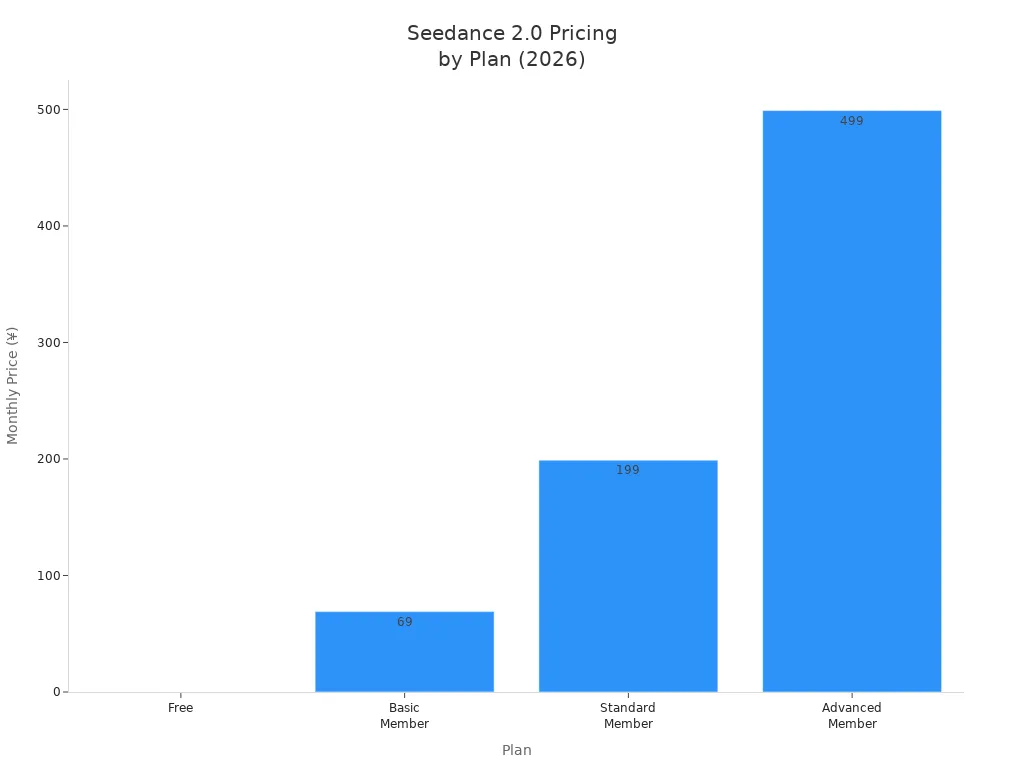
You can see that seedance gives you a lot of value for each plan. The higher the plan, the more credits and video quality you get.
Is It Worth It in 2026?
You might wonder if seedance gives you enough value for your money. If you want to make high-quality video projects, the paid plans offer more features and faster results. Many creators say the pricing matches the quality you get. You can try the free plan to test the video tools before you pay. If you need more credits or want the best video quality, upgrading makes sense. The value grows if you use seedance for ads, stories, or creative work.
Tip: Start with the free plan to see if the video quality meets your needs. Upgrade when you want more value and better results.
Compliance and Ethics
You should know about the rules and risks when using seedance. Some studios worry about videos that copy actors or famous characters. There have been cases where users made copyright-violating video clips. Big companies like Disney and Paramount have raised concerns about seedance. ByteDance, the company behind seedance, now uses filters to block these videos. They also work on better safeguards and follow new rules for AI video. You need to respect copyright and only use seedance for legal and fair projects.
Concerns about actor likeness and copyright
Filters now block protected video content
ByteDance works to improve compliance and data safety
New rules and best practices guide how you use seedance
If you follow the rules, you can enjoy the value and quality that seedance brings to your video projects.
You notice seedance changes how people make videos. People in China use seedance with easy prompts. Some Hollywood groups worry about copyright problems with seedance. If you need a quick video, seedance can help you. Keep an eye out for new AI video trends. Many brands use seedance to make marketing videos. Think about what you need before you use seedance.
People in China get the most from seedance tools.
Hollywood groups worry about copyright in seedance videos.
New AI video tools help creators do more.
Brands use seedance to make marketing videos.
AI-made videos become popular everywhere.
Brands use seedance for videos on social media.
Creators work with partners using seedance videos.
Tip: Think about the good and bad sides of seedance before you pick it for your next video project.
FAQ
How do you start using seedance for your first video?
You open the app, upload your assets, and write your prompt. Seedance guides you step by step. Your first video gets made in minutes.
Tip: Try simple prompts for your first seedance video. You will see quick results.
Can you make longer videos with seedance?
Seedance lets you create videos up to 15 seconds. You can split your story into short clips. Stitch them together for a longer video.
Short clips work best in seedance.
You can combine clips for a full video.
What makes seedance different from other video tools?
Seedance uses multimodal input for video creation. You can add images, audio, and text. Your video stays consistent and looks real every time.
Feature | Seedance | Other Tools |
|---|---|---|
Multimodal | Yes | Sometimes |
Consistency | High | Medium |
Realism | Strong | Varies |
See Also
Best 10 Alternatives to Seedance 2 for AI Video Creation
Utilizing Prompts Effectively in Seedance 2 for Videos
Achieving Flawless Audio-Video Synchronization with Seedance 2.0
Seedance 2 AI Video Creator Simplifies Video Production in 2026