How to Make a Video with AI from an Image

How to Make a Video with AI from an Image
If you want to make a video with AI from an image, do not start by thinking about motion. Start with the still frame.
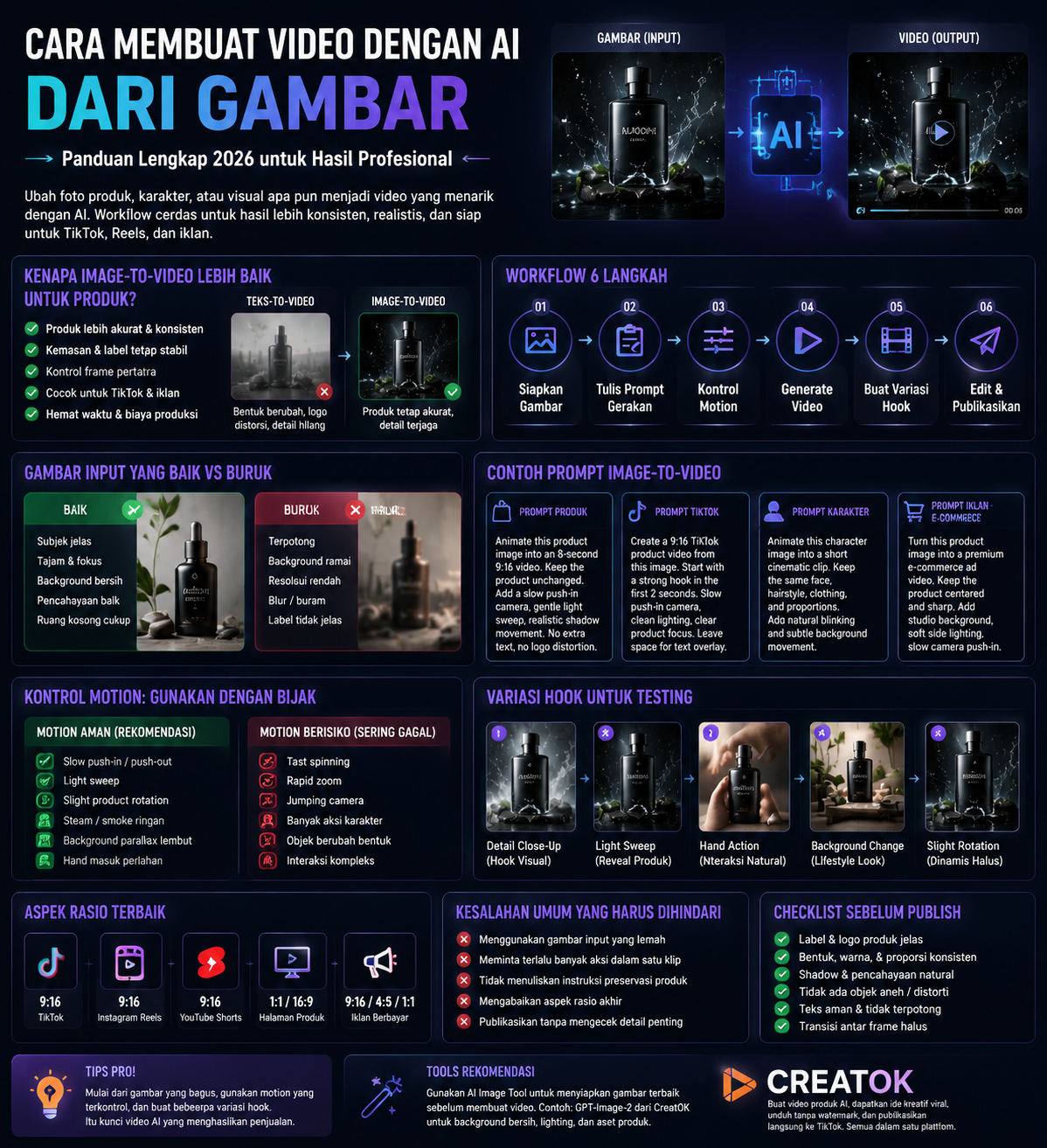
A weak image becomes a weak video. A clean product photo, character frame, or campaign visual gives the AI model a stable anchor. That means better consistency, fewer distorted objects, and less wasted video credit.
This guide breaks down the practical image-to-video workflow: when to use it, how to write prompts, how to control motion, and how to avoid the common failures that make AI videos look synthetic.
Why Image-to-Video Works Better Than Text-to-Video for Products
Text-to-video is useful when you want to explore a visual idea. Image-to-video is stronger when something must stay accurate.
For e-commerce, that difference matters.
If you ask a model to generate a video of “a black stainless steel water bottle,” it may invent the bottle. The shape may shift. The logo may distort. The cap may change between frames.
If you upload the actual product image first, the AI has a reference. It can animate the scene while keeping the product closer to the original.
Use image-to-video when you need:
product accuracy
consistent packaging
stable character identity
controlled first frame
TikTok product clips
ad creative variations
short social videos from existing images
For a broader workflow, see the main guide: make a video with AI.
Best Images to Use as AI Video Inputs
Not every image works well. The input image decides how much the model has to guess.
Good Input Image
Use an image with:
clear subject
sharp edges
simple background
visible product shape
correct lighting
no heavy blur
no tiny unreadable text
enough space around the subject
Bad Input Image
Avoid images with:
cropped product edges
messy background
multiple subjects competing for attention
low resolution
strong compression
unclear shadows
distorted product labels
extreme perspective
If your image is not ready, fix it before animation. For product visuals, you can use a GPT-Image-2 workflow to clean the background, improve lighting, or create a transparent product asset before turning it into video.
Step-by-Step: Make a Video with AI from an Image
Step 1: Choose the Final Platform
The platform decides the frame.
Platform | Best Format | Video Style |
|---|---|---|
TikTok | 9:16 | Fast hook, clear product, mobile-first |
Instagram Reels | 9:16 | Clean motion, strong first frame |
YouTube Shorts | 9:16 | Clear subject in first 2 seconds |
Product page | 1:1 or 16:9 | Stable product, slower motion |
Paid ads | 9:16, 4:5, 1:1 | Multiple versions for testing |
Do not generate a 16:9 video first and crop it later for TikTok. You may lose the product, face, or visual hook.
Step 2: Prepare the Image
Before using an image to video AI workflow, check the still image.
Ask:
Is the subject sharp?
Is the product fully visible?
Is the background clean enough?
Does the lighting already match the mood?
Is there enough empty space for captions?
Will the image still work on mobile?
For product videos, the best starting image usually has one main product, a clean composition, and a clear contact shadow.
Step 3: Write a Motion Prompt
A common mistake is using an image prompt for a video task. Video prompts need motion direction.
Use this structure:
text
Subject + motion + camera movement + lighting change + background movement + duration + aspect ratio + constraints
Example:
text
Animate this product image into an 8-second 9:16 TikTok-style video. Keep the product shape, label, color, and proportions unchanged. Add a slow camera push-in, subtle light sweep across the surface, realistic shadow movement, and slight background depth. No extra text, no logo distortion, no new objects.
That prompt gives the model boundaries. It tells the AI what to move and what not to touch.
Step 4: Keep Motion Controlled
Image-to-video fails when the model tries to do too much.
For products, use restrained motion:
text
slow push-in subtle pan light sweep small product rotation steam rising soft background movement hand entering frame slowly
Avoid aggressive motion unless the scene can handle it.
Risky motion includes:
text
fast spinning rapid zoom jumping camera complex hand movement multiple character actions product opening and transforming large object deformation
If the model changes the product, reduce motion. Product accuracy matters more than visual drama.
Step 5: Generate Several Hook Variations
One AI video is rarely enough. For ads and TikTok content, generate variations.
Change only one variable at a time:
Variation | What to Change |
|---|---|
Hook 1 | Camera starts close on product detail |
Hook 2 | Light sweep reveals product surface |
Hook 3 | Hand places product into frame |
Hook 4 | Background changes from plain to lifestyle scene |
Hook 5 | Product rotates slightly while camera pushes in |
This makes testing cleaner. If one version wins, you know why.
For TikTok e-commerce workflows, CreatOK supports product image to video, prompt optimization, and TikTok publishing. Use the AI video generator page when you want to move from a single generated clip into a repeatable content workflow.
Prompt Templates
Product Image to Video Prompt
text
Animate this product image into a [duration] [aspect ratio] video. Keep the product unchanged. Add [camera movement], [lighting effect], and [background motion]. Preserve the product shape, color, label, texture, and proportions. No extra objects, no logo distortion, no unreadable text.
TikTok Product Video Prompt
text
Create a 9:16 TikTok product video from this image. Start with a strong visual hook in the first 2 seconds. Use a slow push-in camera movement, clean commercial lighting, and clear product focus. Leave space at the top for text overlay. Keep the product accurate.
Character Image to Video Prompt
text
Animate this character image into a short cinematic clip. Keep the same face, hairstyle, clothing, and body proportions. Add subtle head movement, natural blinking, soft background motion, and realistic lighting. Do not change the identity.
E-commerce Ad Prompt
text
Turn this product image into a short e-commerce ad video. Keep the product centered and sharp. Add a premium studio background, soft side lighting, realistic contact shadow, and a slow camera push-in. No extra text, no fake logo, no packaging changes.
Common Mistakes
Mistake 1: Uploading a Weak Image
If the first frame is messy, the video will inherit the mess. Fix the still image first.
Read this guide if the product image itself needs work: best AI art generator app for product images.
Mistake 2: Asking for Too Much Action
One short clip should do one main thing. A product reveal, camera zoom, hand action, background transition, and logo animation in the same 8 seconds is too much.
Mistake 3: Ignoring Product Preservation
Always write what must stay unchanged:
text
Keep the product shape, color, label, logo, texture, and proportions unchanged.
Do not assume the model understands that automatically.
Mistake 4: Using the Wrong Aspect Ratio
A square product image can work, but if your final output is TikTok, plan for 9:16 early. The subject needs room to breathe vertically.
Mistake 5: Publishing Without Checking Details
Before publishing, check:
product label
logo
shape
shadows
hands
reflections
background text
frame transitions
caption safe zones
AI video errors often hide in the second or third second.
Best Workflow for E-commerce Teams
For product sellers, the strongest workflow is:
text
1. Prepare product image 2. Clean or enhance it with AI image tools 3. Generate image-to-video clip 4. Create 3-5 hook variations 5. Pick the cleanest version 6. Add captions or overlay text 7. Publish or schedule for TikTok testing
This workflow is faster than filming every product angle from scratch. It also keeps creative testing flexible.
CreatOK is built for this kind of short-form e-commerce workflow: product images, video generation, viral creative references, no-watermark downloads, and TikTok publishing from one production path.
FAQ
Can I make a video with AI from one image?
Yes. You can upload one image and use AI to animate it into a short video. For best results, use a sharp image with a clear subject and controlled background.
Is image-to-video better than text-to-video?
For product videos, yes. Image-to-video gives the model a visual reference, which helps preserve product shape, color, and packaging. Text-to-video is better for concepts and imaginary scenes.
How long should an AI image-to-video clip be?
Start with 6-10 seconds. Short clips are easier to control and cheaper to test. Longer clips often require multiple scenes and manual editing.
How do I stop the product from changing?
Use a clear reference image and write strict constraints in the prompt. Tell the model to preserve product shape, label, color, texture, and proportions.
Can I use AI image-to-video for TikTok ads?
Yes, but review the final video carefully. Make sure the product is accurate, the claims are truthful, and the final export follows platform and commercial usage rules.
Final Verdict
If you want to make a video with AI from an image, the still frame matters more than the model hype.
Start with a clean image. Use controlled motion. Preserve the subject. Generate multiple hooks. Review the final clip like an editor, not a fan of the technology.
For e-commerce and TikTok creators, image-to-video is usually the safest path because it gives the AI a visual anchor. Build the image first, animate second, then test the hook that sells fastest.