What Are the 1080p Output Features of Seedance 2.0

You can make great videos with seedance 2 1080p output features. These features give you clear 1080p quality, no watermarks, and easy edits. You can pick from different aspect ratios like 16:9, 21:9, and 1:1. You can use text, images, video, or audio as input. The platform makes videos that are 4 to 15 seconds long. This lets you get movie-like quality and works for many creative ideas.
Feature | Benefit |
|---|---|
1080p Output | Ready for professional use |
Aspect Ratios | Works for any screen size |
Input Modalities | Four ways to be creative |
Key Takeaways
Seedance 2.0 gives you 1080p and 2K resolution. Your videos look professional and cinematic on any screen.
You can pick different aspect ratios like 16:9 or 1:1. This helps your videos fit well on any platform.
You can mix text, images, audio, and video easily. You do not need detailed prompts to make cool and interesting content.
You can set your video length from 4 to 15 seconds. This lets you control timing for your project.
Seedance 2.0 puts visuals and audio together smoothly. This saves you time and makes your videos better.
Seedance 2 1080p Output Features
Full HD and 2K Resolution
Seedance 2 gives you clear and sharp video. You can use 1080p or 2K resolution. Your video will look like a movie on any screen. The diffusion transformer technology makes the video quality better. This helps your video get noticed. Check the table below for details:
Resolution | Output |
|---|---|
2K | Supported |
1080P | Supported |
4K | Not specified |
Pick 1080p for most of your videos.
Choose 2K if you want even more detail.
The settings let you pick what works best.
Supported Aspect Ratios
Seedance lets you pick different aspect ratios. This means your video can fit any screen or app. The 1080p output features support both normal and movie-like ratios. Look at the table to see your choices:
16:9 |
9:16 |
21:9 |
4:3 |
1:1 |
Use 16:9 for wide screens. Use 9:16 for tall videos. Pick 21:9 for a movie look. You can also use 4:3 or 1:1 for old-style or square videos. This makes it easy to make videos for any device.
Input Modalities
Seedance lets you use many types of input. You can add text, images, video, or audio. Each one helps you be creative. You can mix these inputs for better videos. Here is a table with the options:
Format | Maximum Count | Maximum Size | |
|---|---|---|---|
Images | JPG, JPEG, PNG, WEBP, BMP, TIFF, GIF | Up to 9 | 30 MB each |
Videos | MP4, MOV | Up to 3 (total duration ≤ 15s) | 50 MB each |
Audio | MP3, WAV | Up to 3 (total duration ≤ 15s) | 15 MB each |
Text can set the story. Images can show people or places. Video clips can show movement. Audio can match what you see. Seedance puts all these together. Your video looks like a movie and everything fits well. One user said, "No detailed prompts required — just show what you want." This means it is easy to use different inputs.
Video Duration Range
You can pick how long your video is. Seedance 2 lets you make videos from 4 to 15 seconds. You can use a slider to choose the time. This gives you more control than other apps. See the table below:
Maximum Duration | |
|---|---|
4 seconds | 15 seconds |
You can see how seedance compares to other apps in the chart:
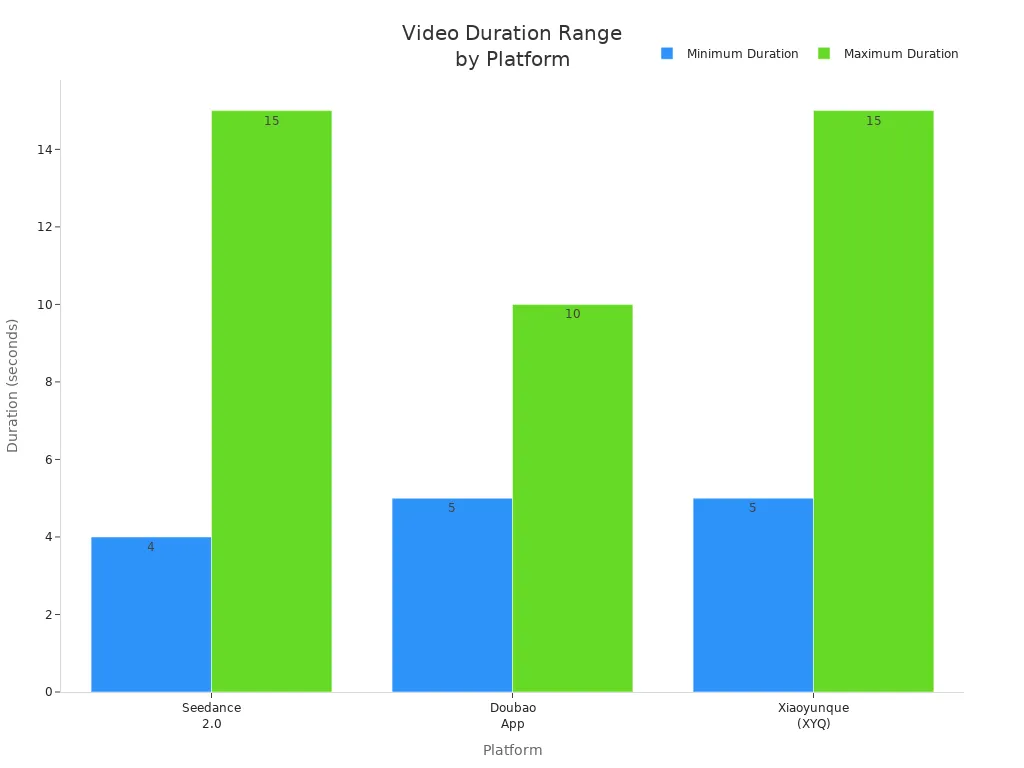
You can set the video length exactly how you want. Other apps only let you pick from set times. Seedance lets you choose the best length for your project.
Tip: Use the slider to pick the best time for your video. This helps you make your video just right.
Flexibility and Professional Quality
Seedance 2 1080p output features are flexible and look professional. You can pick the resolution, aspect ratio, input, and length. You can make movie-like videos for anything you want. Use seedance for ads, social media, or fun projects. The platform helps your videos look great and stand out.
Cinematic Quality and Motion

Professional Broadcast Standards
Seedance helps you make videos like a pro. The platform follows high standards for movie quality. It gives you clear 1080p HD output with smooth motion and real details. You get advanced video making, rich details, and movie-like looks. The system lets you make videos with many shots. This helps you build complex scenes. You can control how characters look, act, and move. Dual-branch audio makes music and sounds match the video perfectly. The table below shows how seedance meets pro standards:
Feature | Description |
|---|---|
Video Generation | Advanced tools for smooth motion and rich details |
Cinematic Aesthetics | High-quality production focused on visual stories |
Multi-shot Video Generation | Makes complex videos needed for pro work |
Character Control | Lets you control how characters look and move |
Audio Generation | Dual-Branch audio for perfect timing in music and sound |
Seedance is a top choice for creative people who want control. The 12-file input system fits pro work needs. You can make music videos with perfect timing. Many users think seedance is a big step forward in text-to-video tech.
Physics Engine for Smooth Motion
Seedance uses a strong physics engine for smooth motion. You see fluid effects and real movement in every video. The engine supports native 1080p high-quality video making. It keeps motion real and style steady. The table below compares motion scores:
Metric | Seedance 2.0 | Veo 3 (Google) | Wan 2.2 (Alibaba) | Kling 2.1 (Kuaishou) |
|---|---|---|---|---|
Edge Stability | 8/10 | 7/10 | 6/10 | 5/10 |
Motion Flow | 9/10 | 7/10 | 6/10 | 5/10 |
Style Consistency | 8/10 | 7/10 | 6/10 | 4/10 |
Face Consistency | 7/10 | 7/10 | 5/10 | 4/10 |
Camera Control | 9/10 | 7/10 | 5/10 | 4/10 |
Average | 8.2 | 7.0 | 5.6 | 4.4 |
You get movie quality with smooth motion and tiny details. Frame interpolation adds extra frames for smoother play. Sharpening fine details makes things clearer. Reducing compression marks gives cleaner pictures. Upscaling to 4K makes videos look even better.
Visual and Audio Integration
Seedance matches visuals and audio for a movie-like feel. The platform makes audio that fits the video frame by frame. You hear talking, background sounds, and effects that match each scene. Physics-based audio changes sound to fit the place, making it feel real. Unlike other AI video tools, seedance makes video and audio together. This means you do not need to edit audio by hand and saves time.
Tip: You can make a 60-second short in just 15 minutes with seedance. This helps you work faster and be more creative.
You get movie quality with perfect audio match. The system gives pro results for music videos, ads, and stories. You get great visuals and smooth sound, all in one platform.
Seedance vs Other Platforms
Unique Features
Seedance has special features that make it different. You can use text, images, audio, and video as input. You can pick from many aspect ratios. This helps your video fit any screen. The platform supports 1080p and 2K resolution. You get a movie look with smooth motion and rich details. Batch generation lets you make many clips fast. Dual-branch audio matches music and sound with visuals. These features help you make pro videos for ads, stories, or social media.
Performance Comparison
Seedance is fast and gives good quality. You can make a 5-second video in less than 60 seconds. Sora 2 takes longer and changes by how busy it is. Batch generation works better in seedance. The table below shows how seedance and Sora 2 compare:
Metric | Seedance 2.0 | Sora 2 |
|---|---|---|
5s Video | < 60 seconds | Slower |
Speed Increase | 30% faster v1.5 | – |
Short Clip Gen | 2-5s, very fast | Moderate speed |
Batch Gen Efficiency | High | Moderate |
You also get high output quality. Seedance scores well in motion, physics, audio sync, and resolution. The chart below shows quality ratings at 1080p:

Quality Dimension | Seedance 2.0 | Sora 2 |
|---|---|---|
Motion Quality | ★★★★☆ (4/5) | ★★★★☆ (4/5) |
Physics Accuracy | ★★★★☆ (4/5) | ★★★★★ (5/5) |
Audio Sync | ★★★★★ (5/5) | ★★★★☆ (4/5) |
Resolution & Detail | ★★★★★ (5/5) | ★★★★☆ (4/5) |
User Experience
Seedance gives you a smooth and creative experience. You can mix different inputs and change settings for each project. The platform is good for short movie-like clips and quick edits. Users say seedance is strong for making short, cinematic videos. Some problems happen with longer takes or complex actions. You may see audio problems or messy subtitles in longer videos. The table below shows strengths and weaknesses:
Strengths | Weaknesses |
|---|---|
Strong for short cinematic beats | Challenges with long continuous takes |
Issues with complex physical interactions | |
Audio artifacts in longer sequences | |
Disordered voice rendering and subtitles |
Note: Seedance gives you flexibility and speed for short, cinematic projects. You can make high-quality videos with less effort.
You can use Seedance 2.0 to make strong 1080p videos. It gives you steady motion and clear pictures. Characters move smoothly and look the same in each frame. You can add up to 12 things to your video for more choices. The platform helps you make videos that look like movies. You get cool camera cuts and sound that matches the action. Many people say Seedance saves time and helps tell big stories.
Feature | Benefit |
|---|---|
Scenes have perfect timing | |
High-Quality Output | Videos look real and like movies |
Extended Clip Length | Each part can be up to 15 seconds |
Try Seedance 2.0 for your next project. You will get quick results and pro quality.
FAQ
What makes Seedance 2.0 a multimodal ai video generator?
You can use text, images, audio, and video as input. Seedance 2.0 combines these formats to create unique videos. This flexibility helps you tell stories in many ways.
How does Seedance 2.0 improve video quality?
Seedance 2.0 uses advanced technology to boost clarity and detail. You get smooth motion and sharp visuals. The ai video generator produces videos that look professional and cinematic.
Can I use Seedance 2.0 for social media content?
Yes! You can pick aspect ratios like 16:9 or 1:1. The multimodal ai video generator lets you create videos that fit any platform. You can share your work easily.
What is the maximum video length I can make?
You can make videos up to 15 seconds long. The ai video generator gives you control over duration. Use the slider to set the exact length for your project.
Is Seedance 2.0 easy to use for beginners?
You do not need detailed prompts. You can add your inputs and adjust settings. The platform guides you step by step. Many users find it simple and quick to create videos.
See Also
Achieving Flawless Audio And Video Sync With Seedance 2.0
Essential Insights On Seedance 2.0 For 2026 Users
Utilizing Seedance 2.0 For Creating Text-To-Video Content
Comparing Video Generation Capabilities Of Seedance 2.0 And Others