Best AI Generator in 2026

Best AI Generator in 2026: Tools by Real Use Case
The best AI generator is not one tool. It depends on what you need to produce: text, images, video, code, product ads, or social content.
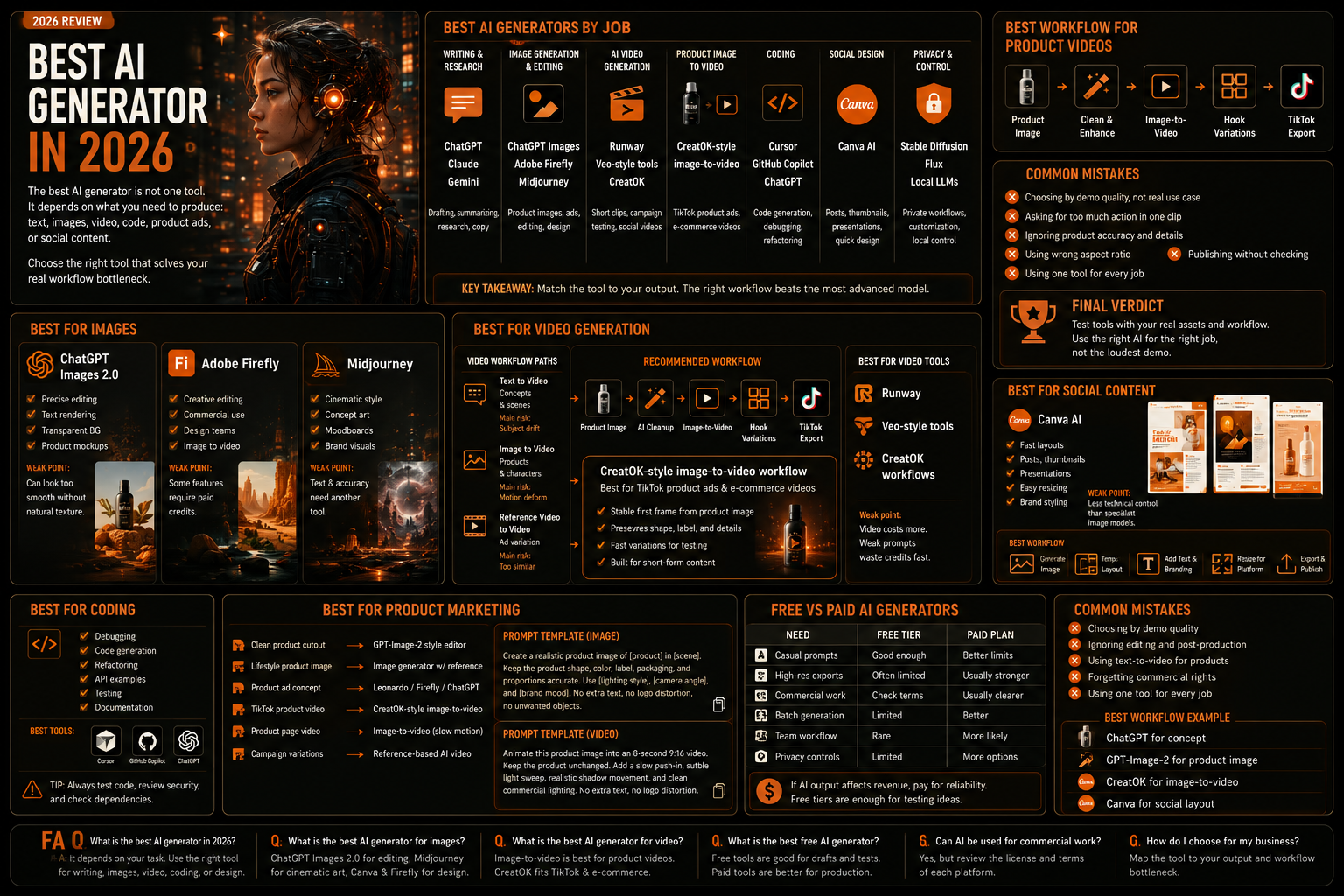
For creators and marketers, the expensive mistake is choosing the tool with the best demo instead of the tool that removes the real bottleneck. A strong AI text generator may be poor at images. A cinematic image tool may fail at product accuracy. A video model may look impressive but burn credits fast if the first frame is weak.
This guide compares the best AI generators by actual workflow, not by hype.
Quick Verdict: Best AI Generators by Job
Use Case | Best AI Generator Type | Best Fit |
|---|---|---|
Writing and research | ChatGPT / Claude / Gemini | Long-form reasoning, drafting, summarizing |
Image generation and editing | ChatGPT Images 2.0 / Adobe Firefly / Midjourney | Product images, ads, design concepts |
AI art and cinematic visuals | Midjourney | Moodboards, concept art, brand visuals |
Social design | Canva AI | Fast layouts, posts, thumbnails, presentations |
AI video generation | Runway / Veo-style tools / CreatOK workflows | Short clips, product videos, campaign testing |
Product image to video | CreatOK-style image-to-video workflow | TikTok product ads, e-commerce videos |
Coding | Cursor / GitHub Copilot / ChatGPT | Code generation, debugging, refactoring |
Local privacy and control | Stable Diffusion / Flux / local LLMs | Custom workflows, private assets, technical users |
How to Choose the Best AI Generator
Do not start with a brand name. Start with the output.
Ask five questions:
What do I need to create?
Does the output need to be accurate or just creative?
Do I need editing after generation?
Will this asset be used commercially?
How many variations do I need per week?
A freelancer making thumbnails needs a different AI generator than a TikTok seller making product videos. A developer debugging backend code needs a different tool than a designer creating visual concepts.
Best AI Generator for Writing and Research
For text generation, the strongest options are still large conversational models such as ChatGPT, Claude, and Gemini.
Use them for:
article outlines
research summaries
email drafts
ad copy
scriptwriting
product descriptions
technical explanations
prompt planning
The key is not asking the model to “write something good.” Give it constraints.
Better prompt:
text
Write a 900-word product comparison for e-commerce sellers. Use a neutral editorial tone. Include pricing considerations, workflow differences, and a decision table. Avoid generic marketing phrases.
Weak prompt:
text
Write an amazing article about AI tools.
Where Text Generators Fail
Text generators can still invent facts, flatten brand voice, and produce safe but forgettable copy. For SEO, they need human editing, source checking, and a strong angle.
Best fit: research, first drafts, outlines, rewrites.
Bad fit: publishing without review.
Best AI Generator for Images
For images, the answer depends on whether you need creative style or controlled editing.
ChatGPT Images 2.0
ChatGPT Images 2.0 is strong when you need precise instruction following, editing, text rendering, and transparent backgrounds. OpenAI’s help docs describe support for image creation and editing across web, iOS, and Android, with the ability to add text, add image details, and make backgrounds transparent.
Best for:
product mockups
blog visuals
social graphics
transparent cutouts
prompt-based editing
marketing images with text
Weak point:
Some outputs can look too smooth if you do not specify natural texture and lighting.
Internal link suggestion: use AI Image Generator guide when explaining text-to-image basics.
Adobe Firefly
Adobe Firefly fits professional creative teams because it connects generation with editing, mobile workflows, Creative Cloud, and production handoff. Adobe’s Firefly app combines image and video generation, sound effects, and AI-powered editing tools.
Best for:
campaign visuals
commercial editing
design teams
social assets
image-to-video experiments
Weak point:
Some features require paid credits or plans.
Midjourney
Midjourney remains one of the best AI generators for cinematic image style. Its official web app supports prompting, image references, style references, personalization, and image-to-video workflows.
Best for:
concept art
moodboards
editorial visuals
cinematic scenes
premium brand direction
Weak point:
Exact text, product geometry, and surgical edits can require another tool.
Best AI Generator for Video
AI video generation is where workflow matters most. Video costs more than image generation, so weak prompts waste credits quickly.
There are three major paths:
Workflow | Best For | Main Risk |
|---|---|---|
Text to video | Concepts and scenes | Subject drift |
Image to video | Products and characters | Motion deformation |
Reference video to video | Ad variation | Copying too closely |
For e-commerce and TikTok content, image-to-video is usually the safest path. A clean product image gives the model a stable first frame.
Recommended workflow:
text
Product image -> AI image cleanup -> image-to-video -> hook variations -> TikTok export
This is where CreatOK fits naturally. CreatOK is useful when the job is not simply “make one AI video,” but to produce repeatable short-form product content for TikTok and e-commerce campaigns.
Internal link suggestion: use AI video generator when discussing video tools.
Use make a video with AI when explaining workflow selection.
Use make a video with AI from an image when discussing product references.
Best AI Generator for Social Media Content
For social content, the best AI generator is often not the most advanced model. It is the tool that gets you from idea to export fastest.
Canva AI
Canva works well for creators who need finished posts, thumbnails, posters, and presentations. Its AI image tools sit inside a design editor, which matters when the final asset needs layout, text, resizing, and brand styling.
Best for:
Instagram posts
YouTube thumbnails
Pinterest graphics
presentation slides
quick ad creatives
Weak point:
Less technical control than specialist image models.
Best Workflow
text
Generate image -> place in template -> add readable text -> resize by platform -> export
For creators, this often beats generating a beautiful standalone image that still needs design work.
Best AI Generator for Product Marketing
Product marketing is stricter than general creative work. The product must stay accurate.
Use this decision table:
Product Task | Best Generator Type |
|---|---|
Clean product cutout | GPT-Image-2 style image editor |
Lifestyle product image | Image generator with reference support |
Product ad concept | Leonardo / Firefly / ChatGPT Images |
TikTok product video | CreatOK-style image-to-video workflow |
Product page video | Image-to-video with slow camera motion |
Campaign variations | Reference-based AI video workflow |
Prompt template:
text
Create a realistic product image of [product] in [scene]. Keep the product shape, color, label, packaging, and proportions accurate. Use [lighting style], [camera angle], and [brand mood]. No extra text, no logo distortion, no unwanted objects.
For video:
text
Animate this product image into an 8-second 9:16 video. Keep the product unchanged. Add a slow push-in, subtle light sweep, realistic shadow movement, and clean commercial lighting. No extra text, no logo distortion.
Internal link suggestion: use best AI art generator app for product images when discussing product visuals.
Best AI Generator for Coding
For coding, the best AI generator is the one that understands the project context and helps without rewriting everything.
Use AI coding tools for:
debugging
test generation
refactoring
API examples
documentation
boilerplate
code review
Do not trust generated code blindly. Run tests. Check security assumptions. Review dependency changes.
Best fit: speeding up known engineering tasks.
Bad fit: replacing architecture judgment.
Free vs Paid AI Generators
Free tools are useful for testing. Paid tools are useful for production.
Need | Free Tier | Paid Plan |
|---|---|---|
Casual prompts | Good enough | Better limits |
High-resolution exports | Often limited | Usually stronger |
Commercial work | Check terms carefully | Usually clearer |
Batch generation | Limited | Better |
Team workflow | Rare | More likely |
Privacy controls | Limited | More options |
If AI output affects revenue, pay for reliability. If you are only testing an idea, free tiers can be enough.
Common Mistakes When Choosing an AI Generator
Mistake 1: Choosing by Demo Quality
Demo images are curated. Test the tool with your actual use case.
Mistake 2: Ignoring Editing
Generation is only the first step. If the tool cannot edit well, you will lose time fixing outputs elsewhere.
Mistake 3: Using Text-to-Video for Products
Use image-to-video when product accuracy matters. Text-only generation can invent details.
Mistake 4: Forgetting Commercial Rights
Check the platform’s usage terms before using AI assets in ads, client work, packaging, or paid campaigns.
Mistake 5: Using One Tool for Every Job
The best workflow usually combines tools.
Example:
text
ChatGPT for concept GPT-Image-2 for product image CreatOK for image-to-video Canva for social layout
FAQ
What is the best AI generator in 2026?
There is no single best AI generator for every task. ChatGPT is strong for writing and image editing, Midjourney is strong for cinematic visuals, Adobe Firefly is strong for creative production, Canva works well for social design, and CreatOK fits short-form product video workflows.
What is the best AI generator for images?
For controlled image editing, ChatGPT Images 2.0 and GPT-Image-2 style tools are strong. For cinematic art, Midjourney is stronger. For design-ready assets, Canva and Adobe Firefly are practical choices.
What is the best AI generator for video?
For product videos, image-to-video workflows are usually better than pure text-to-video. CreatOK is useful for TikTok and e-commerce video production because it connects product images, video generation, creative variation, and publishing workflows.
What is the best free AI generator?
The best free option depends on output type. Free text tools can handle drafts and summaries. Free image generators can support light visual work. Free video tools usually have stricter limits because video generation costs more.
Can AI generators be used for commercial work?
Yes, but review the license and usage terms of each tool. Commercial rights, training data policies, watermark rules, and export limits vary by platform.
How do I choose an AI generator for my business?
Map the tool to the output. If you need articles, choose a strong text model. If you need product images, choose an image editor with reference support. If you need TikTok product videos, choose an image-to-video workflow that preserves the product.
Final Verdict
The best AI generator is the one that solves your production bottleneck.
Use text models for thinking and drafting. Use image models for visual assets. Use video tools when motion matters. Use design platforms when the final output needs layout. Use CreatOK when the goal is short-form product video production for TikTok and e-commerce.
Do not buy the tool with the loudest demo. Test the tool against your real workflow, your real assets, and your real publishing format. That is where the winner becomes obvious.