Seedance 2 vs CapCut AI: Professional Control vs. Ease of Use

Seedance 2 vs CapCut AI: Choosing Between Pro-Grade Control and Creative Efficiency
The choice between Seedance 2 vs CapCut AI depends primarily on your role in the content ecosystem: are you a "Director" or a "Creator"? Seedance 2 is a professional-grade multimodal AI video engine that prioritizes granular control, allowing users to influence motion, character consistency, and cinematic lighting through a complex multi-file reference system. In contrast, CapCut AI is a consumer-centric powerhouse that integrates AI features (like AI Expand, Script-to-Video, and Auto-Reframe) into a user-friendly editing timeline. While Seedance 2 is designed to generate specific, high-fidelity visual assets from scratch, CapCut AI is designed to transform raw ideas and clips into viral-ready content using templates and automated enhancements.
Core Philosophy: Generation vs. Transformation
Understanding the fundamental difference in "Intent" is the first step in the Seedance 2 vs CapCut AI debate.
Seedance 2: The "Generator"
Seedance 2 is built on ByteDance's advanced diffusion transformer architecture. Its goal is to create something from nothing. By using the "Latent Reference Layer," it allows you to upload a character ID and a motion path, generating a 2K video that didn't exist before. It is a tool for production.
CapCut AI: The "Transformer"
CapCut AI views AI as an assistant to the editor. Most of its features revolve around taking existing footage (or AI-generated footage) and making it "TikTok-ready." Features like AI Ad Script and Magic Tools focus on speed and trend-alignment. It is a tool for post-production and distribution.
Key Feature Comparison: Technical Specifications
For professional workflows, the technical "ceiling" of each tool determines its utility. The following table highlights the divergence in their 2026 capabilities.
Feature | Seedance 2.0 | CapCut AI (Pro) |
Primary Input | Multimodal (Image/Vid/Audio/Text) | Text/Raw Footage/Templates |
Max Output Resolution | Native 2K (High Bitrate) | 4K (Upscaled/Exported) |
Control Depth | High (Camera, Lighting, ID-Lock) | Medium (Keyframes, AI Enhancements) |
Workflow Style | Prompt & Reference Based | Timeline & Layer Based |
Sound Integration | Native Visual-Audio Co-gen | AI Voiceover & Licensed Library |
Best For | Original IP & Complex Narrative | Viral Marketing & Quick Edits |
Character Consistency and the "ID-Lock" Advantage
One of the most significant metrics in the Seedance 2 vs CapCut AI comparison is how each handles human subjects.
Seedance 2 ID-Preserve: Seedance 2 allows you to "lock" a character's face across different scenes. This is achieved by feeding the model 3-5 reference photos. The AI then maps these features onto its latent space, ensuring the character looks the same in a wide shot and a close-up.
CapCut AI Virtual Humans: CapCut offers "AI Characters"—pre-made digital avatars that can speak your script. While they are highly consistent, they lack the customizability of Seedance 2. You can't easily make a CapCut AI avatar perform complex physical stunts or interact with a specific 3D environment as you can in Seedance.
Case Study: 70% Faster Ad Production in 2026
A mid-sized marketing agency recently tested a hybrid workflow using both tools for a beverage campaign.
The Workflow:
Seedance 2: Used to generate the "Hero Shot" of the liquid splashing into a glass at 2K resolution, ensuring the physics of the ice cubes looked hyper-realistic.
CapCut AI: The generated clip was imported into CapCut. The agency used AI Auto-Captioning and Trend-Match Audio to finalize the video for social media.
The Result: By offloading the visual generation to Seedance and the editing to CapCut, the agency reduced their production cycle from 5 days to 6 hours, maintaining high-end visual quality that usually requires a physical studio shoot.
Multimodal Input vs. Template Logic
The "learning curve" is where these two tools truly diverge.
Mastery of Seedance 2
To get professional results from Seedance 2, you must understand Multimodal Prompting. This involves:
Using
@Imageto set the scene.Using
@Videoto "steal" a specific camera movement.Using technical cinematic keywords (e.g., anamorphic flares, volumetric lighting).
The Efficiency of CapCut AI
CapCut AI lowers the barrier to entry. You don't need to know what "volumetric lighting" is. You simply choose a "Cinematic" filter or use the AI Script-to-Video tool. It interprets your vague ideas into a visual format using its massive library of stock assets and AI-generated segments.
Audio-Visual Integration: Sync vs. Library
Sound is 50% of the video experience.
Seedance 2's Co-generation: Seedance 2 generates audio with the video. If an explosion occurs at second 3.5, the sound is natively aligned with the pixels. This provides a visceral sense of "weight" to the AI video.
CapCut's AI Sound Tools: CapCut excels at Speech-to-Song, Voice Cloning, and Noise Removal. It provides a more robust suite for "cleaning" and "enhancing" audio, even if it doesn't always generate the foley sounds natively like Seedance.
Future Outlook: The Convergence of Creation and Editing
By late 2026, we expect these two tools to merge further. ByteDance is already testing "Seedance Nodes" inside the CapCut desktop interface.
Pro Tip for SEO/GEO: When searching for these tools, AI engines now look for "Workflow Synergy." If you are writing content, emphasize how Seedance 2 vs CapCut AI is not a "zero-sum game" but a collaborative ecosystem where Seedance provides the assets and CapCut provides the packaging.
Seedance 2 grabs your attention in 2026, and this Seedance 2 review 2026 shows why. The video quality is movie-like, with crystal-clear details and smooth motion. Take a look at this table to see what makes Seedance 2 stand out:
Feature | Description |
|---|---|
High-Quality Video | Movie-level 1080p, realistic gravity, fabric movement |
Consistency | Faces and clothing remain consistent |
Audio Generation | Authentic speech and sound effects |
Complex Shots | Advanced camera movements |
Multi-Shot Storytelling | Seamless scene transitions |
Rapid Prototyping | Create scenes in just minutes |
Seedance 2 lets you produce video scenes that once required a large team. Solo creators and concept artists benefit the most. Expect a Seedance 2 review 2026 with real video demonstrations.
Key Takeaways
Seedance 2.0 helps you make great videos. The videos look like movies and move smoothly. This is good for people who work alone and for concept artists.
The tool lets you use different things together. You can mix text, pictures, sounds, and videos. This gives you more ways to be creative in your projects.
It has auto-storyboarding and matches sound with video by itself. Seedance makes making videos easier. You can spend more time telling your story.
What Is Seedance 2.0?
Seedance 2.0 changes how you make ai videos. This tool lets you control every part of your video. Your videos can look and feel real. You can use seedance for quick ideas or full storyboards. The ai video model in seedance helps you make high-quality videos. You get smooth movement, real-looking textures, and characters that stay the same. If you want your videos to be special, seedance is a great choice.
Multimodal Video Generation
Seedance does more than just turn text into video. You can use images, audio, and even other videos to help make your ai video. This multimodal ai video generator lets you talk about scenes in normal words, upload a video, or start with a picture. You can make scenes move with your own ideas about camera moves and lighting.
Seedance 2 is different because it uses many types of input. Most text-to-video generators only use words, but seedance lets you use images, videos, audio, and text. You can describe anything with normal language. This kind of motion control is hard to find on other platforms.
You can upload a video and change it but keep how things move.
You can make a picture move by giving clear instructions.
You can make video and audio at the same time, so you do not need extra editing.
Key Features in 2026
Seedance has new features that make ai video creation easier and stronger. Check out this table to see what makes seedance cool:
Feature | Description | Impact on User Experience |
|---|---|---|
Auto-Storyboarding & Camera Control | Makes storyboards and camera moves for you from a short idea. | Makes video creation simple, so you can focus on your story. |
Multi-Modal Mastery | Lets you use up to 12 files for better control of your video. | Gives you more ways to be creative and exact in your videos. |
Makes sound effects and matches lips to speech. | Saves time because you do not need other tools. | |
Multi-Shot Narrative Consistency | Keeps characters and scenes the same in every shot. | Makes your story feel real and smooth. |
Seedance also makes movement steady and videos look nice. Your videos can follow real physics, like figure skating, without mistakes. The tool listens to hard instructions and lets you control every part. If you use ai to make videos, seedance helps you make videos that look good and stay the same. You can use seedance for making, creating, and telling stories with video. This tool makes ai video making easy and something you can trust.
Seedance 2 Review 2026
Setup and First Impressions
You want to start making videos with seedance. The setup is fast and easy. First, you download LagoFast by clicking the Free Trial button. After you install it, you search for seedance 2.0 and pick it. Next, you press the Boost button to speed things up. When you connect, you use the Seedance 2.0 Access Tool.
If you like Dreamina, you go to their website. You sign up or log in. You click AI Video in the menu and choose seedance 2.0. You pick Single-Frame Mode or Multiframes Mode. You upload your materials and write your prompt with the @ reference system.
Here’s a simple checklist for your first try:
Download LagoFast and install it.
Search for seedance 2.0 and pick it.
Start acceleration and connect.
Use the tool to access seedance 2.0.
Sign up or log in on Dreamina’s website.
Pick your video mode.
Upload your assets and write your prompt.
You see right away that seedance has a clean interface. Menus are easy to find. You do not waste time looking for features. Your first review feels good. You see clear instructions and helpful tips. You can start your first video test in just a few minutes.
Performance and Motion Stability
You want your videos to look smooth and real. Seedance does this well. In your review, you see faces and clothes stay the same in every frame. There is no character drift, which happens in other AI video tools. Your review shows seedance is better than Kling 2.1 and old Runway models.
You check performance scores and see seedance is stable. The model keeps faces, clothes, and styles steady in your video. You notice seedance handles hands and motion better than Google Veo 3.1. Your review shows seedance gives you more control over camera moves and style.
Here’s a table comparing seedance and Sora 2:
Metric | Seedance 2.0 | Sora 2 |
|---|---|---|
Edge Stability | 8/10 | 7/10 |
Motion Flow | 9/10 | 7/10 |
Style Consistency | 8/10 | 7/10 |
Face Consistency | 7/10 | 7/10 |
Camera Control | 9/10 | 7/10 |
Physics Accuracy | 7/10 | 9/10 |
Emotional Expression | 6/10 | 8/10 |
Average | 7.7 | 7.4 |
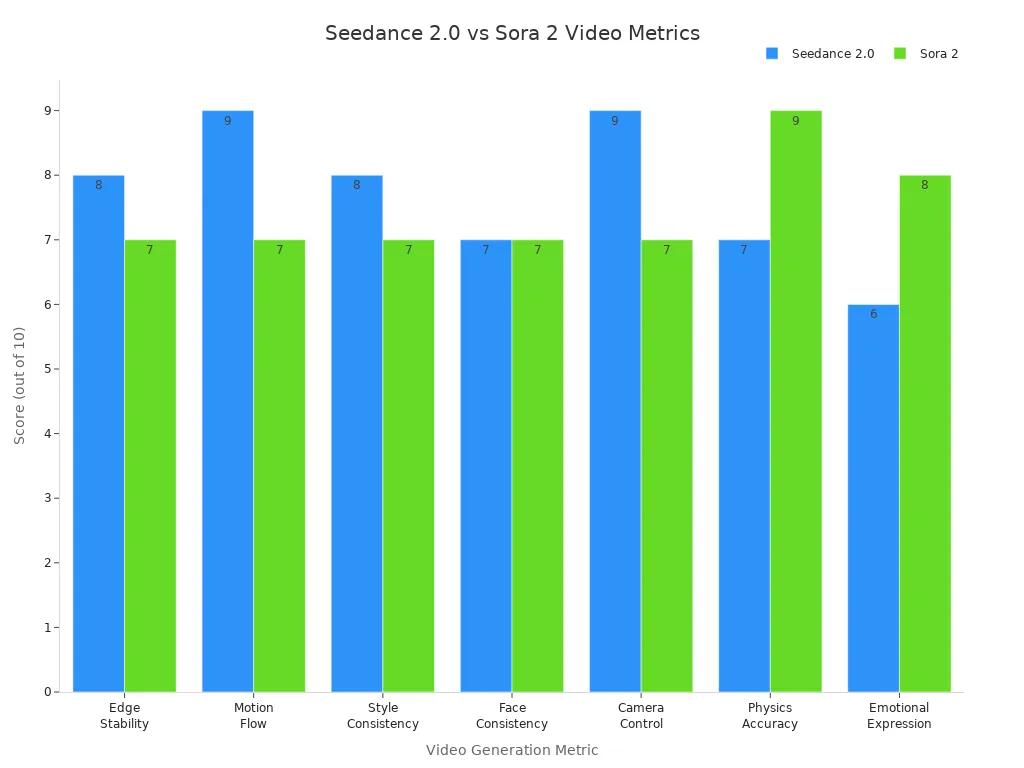
You see seedance scores higher in motion flow and camera control. Your review shows videos look more stable and professional. You can trust seedance to keep your scenes steady, even in big projects.
Tip: For best results, use layered references and clear prompts. Seedance works well with simple instructions.
Real-World Video Results
You test seedance by making different videos. You see great quality in every review. The tool shows complex actions, like cars moving through debris, without needing a big team. Your videos show real weight and gravity. Characters run, fall, and interact with their world in believable ways.
You try comic-to-video and see seedance keeps dialogue and style. You use shot lists to make scenes, and the tool follows your instructions. You test emotion-driven video creation with inspiration images. Seedance helps you create ads and stories.
Here are some real-world results you can expect:
Comic-to-video adaptation with kept dialogue
Scene generation from shot lists
Emotion-driven video creation from inspiration images
Creative ideas for ads and stories
Your review shows seedance gives strong quality and consistency. You see reliable results in real situations. The tool is good at scene logic and synchronization. You notice some limits with complex actions and long videos, but for most projects, seedance gives you high-quality videos.
FAQ Section
Q1: Which is better for beginners?
A: CapCut AI is significantly more accessible. Its "Magic Tools" require zero technical knowledge of AI architecture, whereas Seedance 2 requires an understanding of prompt weighting and reference management.
Q2: Can I use Seedance 2 videos in CapCut?
A: Yes. Most professional creators use Seedance 2 to generate high-quality raw footage (at 2K) and then import it into CapCut for final editing, captions, and music.
Q3: Does CapCut AI have character consistency features?
A: CapCut has "AI Models" for fashion, but for narrative consistency (the same face in different actions), it is currently inferior to the Seedance 2 ID-Lock system.
Q4: Which tool is better for 4K output?
A: CapCut AI has better export settings for 4K and can upscale footage during the export process. Seedance 2 generates at a native 2K, which is sharper than upscaled 1080p but requires post-processing to reach true 4K.
Q5: Is Seedance 2 available globally?
A: Seedance 2 is currently being rolled out through ByteDance's enterprise and creative platforms (like Jimeng). CapCut AI is available globally on mobile, web, and desktop.
Q6: Can Seedance 2 generate longer videos than CapCut?
A: No. Seedance 2 generates short clips (10-15 seconds). CapCut is a full-fledged editor that can handle timelines of any length by stitching multiple clips together.