Seedance 2.0 vs Kling 3.0 vs Sora 2 vs Veo 3.1

If you want the best movie-like video, Veo 3.1 is the top choice. It has great color and looks very professional. Sora 2 is the fastest for making videos. It also shows very real movement. Seedance 2.0 lets you control scenes well and use exact prompts. This makes it good for hard or detailed scenes. Kling 3.0 has smooth movement and is a good deal. But it may not always work the same way. Look at the chart below to help you pick the best model for your needs.
Model | Cinematic Quality | Speed | Motion Quality | Cost |
|---|---|---|---|---|
Veo 3.1 | Excellent | Good | Very Good | High |
Sora 2 | Excellent | Best | Excellent | Moderate |
Seedance 2.0 | Very Good | Very Good | Very Good | Good |
Kling 3.0 | Very Good | Good | Excellent | Very Good |
Key Takeaways
Pick Seedance 2.0 if you want the most control. It lets you use images, audio, and video clips as input.
Choose Sora 2 if you need to make videos fast. It is very quick and gives you clear, high-quality pictures for fast projects.
Go with Kling 3.0 for good motion quality at a low cost. It makes smooth movement and saves you money.
Use Veo 3.1 if you want videos that look like movies. It gives your project a pro look and sound, great for film-like work.
Think about what your project needs. Each model is best for speed, control, or quality.
Video Generation Comparison Table
Feature Overview
You want to see how each model stacks up for video generation. Here’s a quick look at the main features you care about. This table shows what you get with Seedance 2.0, Kling 3.0, Sora 2, and Veo 3.1. You can check input types, how long your video can be, and how each model handles motion and cinematic quality.
Model | Input Types | Max Duration | Motion Quality | Cinematic Quality | Prompt Control |
|---|---|---|---|---|---|
Seedance 2.0 | Images, Videos, Audio, Text | 15s | Very Good | Very Good | High |
Kling 3.0 | Text, Images | 10s | Excellent | Very Good | Medium |
Sora 2 | Text, Images | 12s | Excellent | Excellent | Medium |
Veo 3.1 | Text, Images | 8s | Very Good | Excellent | Medium |
You can see that Seedance 2.0 gives you the most input options for video generation. It also lets you make longer videos. Kling 3.0 and Sora 2 both do well with motion, but Sora 2 stands out for speed. Veo 3.1 shines when you want your video to look like a movie.
Key Takeaways
If you want the most control over your video generation, Seedance 2.0 is your best bet. You can use images, audio, and even video clips as input.
Sora 2 is the fastest for video generation. It also gives you excellent motion and cinematic quality.
Kling 3.0 offers smooth motion and is great for video generation if you want value and don’t need audio or video input.
Veo 3.1 is perfect for video generation with a broadcast or cinematic look, but it only takes text and images.
Each model has unique features. Think about what matters most for your project—speed, control, or movie-like style.
This comparison helps you match your needs to the right video generation tool. Pick the one that fits your workflow and creative goals.
Seedance 2.0 Cinematic Performance

Specifications
You want your videos to look sharp and feel real. Seedance 2.0 gives you that edge. Check out what you get:
Feature | What It Means for You |
|---|---|
You can use a face photo, dance video, and music beat at the same time. | |
Resolution Specs | Videos come out in 2K (2048×1152) with different aspect ratios for top quality. |
Multi-Shot Capability | The system builds stories with smooth shots and keeps characters looking the same. |
Generation Speed | You get fast results, so you can work quickly and try new ideas. |
Unique Features
Seedance 2.0 stands out when you want a true cinematic feel. Here’s what makes it special:
Native audio and video generation happen together. This means lips match the words and music fits the action.
You can upload your own video to copy camera moves or character actions.
The model keeps characters looking the same, even in different scenes.
High-quality visuals, realistic motion, and immersive sound pull you into the story.
Strengths
You get more control with seedance 2.0 than with other models. You can use many types of input, which helps you create complex scenes. The cinematic quality shines in real-world projects. The system lets you build stories with many scenes, smooth transitions, and characters that never change. You can even add audio and video at the same time. This boosts your video generation performance and makes your work stand out.
Tip: If you want your video to look like a real movie, seedance 2.0 gives you the tools to do it.
Limitations
Seedance 2.0 does a lot, but it’s not perfect. You might need a strong computer for the best results. The cost is higher than some other models. Sometimes, the system can feel complex if you’re just starting out. But if you want top cinematic performance, these trade-offs might not matter to you.
Kling 3.0 Motion & Value
Specifications
Kling 3.0 gives you a lot for your money. You can make videos up to 10 seconds long using text or images as input. The system works fast and keeps your workflow smooth. If you want to see how Kling 3.0 compares to other top models, check out this table:
Metric | Kling v3.2.1 | Runway Gen-4 | Pika 2.0 | Sora Beta |
|---|---|---|---|---|
Avg. Render Time (30s) | 89 sec | 142 sec | 118 sec | 203 sec |
Prompt Adherence Score | 4.32 | 3.89 | 3.65 | 4.47 |
Temporal Consistency | 4.41 | 3.74 | 3.26 | 4.29 |
Artifact Rate (%) | 7.2% | 19.8% | 22.1% | 11.4% |
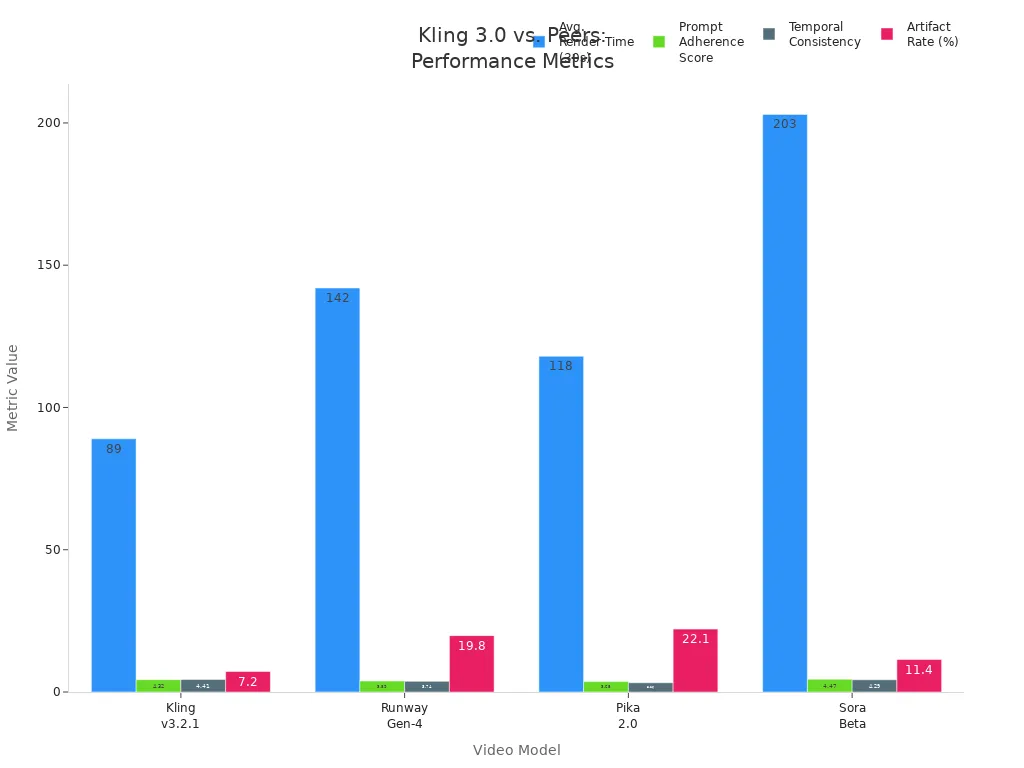
You can see Kling 3.0 stands out for fast render times and low artifact rates. This means you get videos that look clean and finish quickly.
Motion Quality
Kling 3.0 really shines when it comes to motion quality. You get smooth, lifelike movement in every frame. The system uses two big features to help you control how things move:
Motion Brush Technology lets you guide objects and characters with pixel-level accuracy.
Advanced Physics Simulation makes things like water and cloth move in a real way.
You can trust Kling 3.0 to keep motion quality high, even in tricky scenes. Your videos will look natural and keep viewers interested.
Cost Efficiency
If you want value, Kling 3.0 is a smart pick. You get top motion quality without paying a premium price. The system works fast, so you spend less time waiting and more time creating. Many users say Kling 3.0 gives them the best balance between cost and quality. You can make lots of videos without breaking your budget.
Tip: If you need great motion quality and want to save money, Kling 3.0 is hard to beat.
Limitations
Kling 3.0 does have a few limits. You can only use text and images as input, so you miss out on audio or video uploads. The maximum video length is 10 seconds, which might feel short for some projects. Sometimes, the prompt control is not as strong as Seedance 2.0. Still, if you care most about motion quality and value, these limits may not matter much.
Sora 2 Speed & Iteration
Specifications
You want a video generation tool that keeps up with your ideas. Sora 2 gives you that speed. When you use sora 2, you can make videos fast and see results almost right away. The model supports text and image inputs, and you get up to 12 seconds of video per clip. Sora 2 also delivers high-quality visuals, matching professional standards. Check out how sora 2 compares to Veo 3.1 in video benchmarks:
Test Clip | Sora 2 VMAF (8 Mbps) | Veo 3 VMAF (8 Mbps) | Sora 2 SSIM | Veo 3 SSIM |
|---|---|---|---|---|
Cinematic Portrait | 92.3 | 89.7 | 0.94 | 0.91 |
Action Sequence | 87.1 | 85.4 | 0.89 | 0.87 |
Nature Scene | 94.6 | 92.1 | 0.96 | 0.93 |
Complex Motion | 84.2 | 82.8 | 0.86 | 0.84 |
Average | 89.6 | 87.5 | 0.91 | 0.89 |
You can see sora 2 leads in both quality and similarity scores. This means your videos look sharp and stay true to your vision.
Speed & Workflow
Sora 2 stands out for its fast iteration speed. You can try new ideas, tweak your prompts, and see changes in minutes. This makes sora 2 perfect for rapid prototyping. If you want to test different scenes or styles, sora 2 lets you do it without waiting. Here’s how sora 2 compares to other models:
Model | Iteration Speed | Notes |
|---|---|---|
Sora 2 | Fast | Optimized for quick iterations, ideal for rapid prototyping. |
Veo 3.1 | Moderate | Offers a Fast mode, but not specifically noted for iteration speed. |
Seedance 2.0 | N/A | No information available regarding iteration speed. |
Kling 3.0 | N/A | No information available regarding iteration speed. |
You can rely on sora 2 to keep your creative workflow moving. You don’t have to pause and wait for results.
Strengths
Sora 2 brings several strengths to your video generation process. You get improved physical realism, so actions look believable. Sora 2 follows your instructions across multiple shots, keeping characters and lighting consistent. You can create short stories, not just single clips. Sora 2 also synchronizes audio and visuals, so lips match speech and sound effects fit the action. You can switch between photorealistic and cinematic styles with sora 2. If you use sora 2 Pro, you get even higher fidelity, flawless motion, and perfect prompt understanding.
Tip: If you want to make professional-looking videos quickly, sora 2 gives you the tools to do it.
Limitations
Sora 2 does a lot, but you should know its limits. You can only use text and images as input. Sora 2 does not support audio or video uploads. The maximum video length is 12 seconds, which might feel short for some projects. Sometimes, sora 2’s prompt control is not as strong as Seedance 2.0. Still, if you care most about speed and rapid prototyping, sora 2 is a great choice.
Veo 3.1 Cinematic & Broadcast Quality
Specifications
If you want your videos to look like movies, try Veo 3.1. This model gives every clip a real movie feel. You can see the main details in the table below:
Specification Type | Details |
|---|---|
Resolutions | 720p and 1080p (Full HD) |
Frame Rate | 24 FPS (cinematic standard) |
Aspect Ratios | 16:9 (landscape) and 9:16 (portrait) |
Cinematic Quality | Enhanced understanding of cinematic styles, professional-grade camera work simulation, advanced narrative control, film-like lighting and composition, polished results |
Native Audio Generation | Rich, synchronized audio including natural dialogue, realistic sound effects, ambient soundscapes, and musical accompaniment |
Realistic Physics and Motion | True-to-life textures, coherent motion, natural movement, accurate physics simulation, professional-grade realism |
Enhanced Image-to-Video | Superior prompt adherence, excellent character consistency, high-fidelity visual quality preservation, understanding of complex creative intent, support for various artistic styles |
You get full HD video and smooth motion. The videos look just like real movies. Veo 3.1 also makes audio that matches what you see. This means your videos sound great too.
Cinematic Output
Veo 3.1 is special because it makes videos look like films. It understands how movies are made and uses camera moves like a pro. The lighting and colors look just like in real movies. Many people say Veo 3.1 follows prompts well and keeps visuals sharp. Your scenes will look neat and clear.
Veo 3.1 keeps characters looking the same in every shot.
You get movie-style lighting and smooth changes between scenes.
The model can use different art styles, so you can try new looks.
But sometimes, Veo 3.1 has trouble with hard scenes or keeping things the same over time. If you want more control, Seedance 2.0 might be better. Still, for most projects, Veo 3.1 gives you top movie quality.
Broadcast-Ready Features
If you need videos for TV, Veo 3.1 is ready. You can make videos up to 60 seconds long, which is longer than most models. The table below shows how Veo 3.1 compares to others:
Feature | Veo 3.1 | Competitors |
|---|---|---|
Audio Generation | Native audio generation | Silent videos |
60 seconds (extendable) | 10-20 seconds | |
Editing Capabilities | Advanced editing features | Basic editing |
Output Resolution | 1080p HD | Varies |
You can add music, sound effects, and talking right in the model. Veo 3.1 also lets you edit your video with more tools. This helps you make your video look and sound like a TV show or ad.
Tip: Veo 3.1 is a smart choice if you want both movie quality and TV-ready videos in one tool.
Limitations
Veo 3.1 does a lot, but it is not perfect. Sometimes, it has trouble with really hard scenes or keeping motion smooth in long videos. You might notice small problems with how things move over time. The price is higher than some other models, so think about your budget. If you want the most control, Seedance 2.0 may be better for you. Still, for most people, Veo 3.1 gives the best mix of movie and TV quality.
Head-to-Head Video Generation Comparison
Input Flexibility
When you pick a video generator, you want to know what you can use as input. Some models let you use more than just text. Others keep things simple.
Seedance 2.0 gives you the most options. You can use up to 12 files at once. This means you can mix text, images, video clips, and audio for your video generation. If you want to build a complex scene or match a song to your video, this model makes it easy.
Kling 3.0 focuses on visual quality. You can use text and images, but you can’t add audio or video clips. This works well if you want sharp pictures but don’t need extra input types.
Sora 2 keeps things simple. You use text and images for your prompts. This makes it easy to get started, but you have less control over the final video.
Veo 3.1 has a cool feature called first-and-last-frame mode. You can set how your video starts and ends. This helps you control the story, but you still use text and images for prompts.
If you want the most control over your video generation models, Seedance 2.0 is the best pick.
Model | Input Flexibility Features |
|---|---|
Seedance 2.0 | 12-file multimodal input system (text, images, video clips, audio) for complex projects. |
Kling 3.0 | Focus on visual quality with native 4K resolution; lacks multimodal input flexibility. |
Sora 2 | Not specifically mentioned, less emphasis on input flexibility. |
Veo 3.1 | Unique first-and-last-frame mode for narrative control; 8-second native duration with extension options. |
Duration & Resolution
You want your video to be long enough and look sharp. Each video generator has its own limits for duration and resolution.
Seedance 2.0 lets you make videos up to 15 seconds. You get 2K resolution, which looks very clear.
Kling 3.0 gives you 10 seconds per video. You can get native 4K, so your video looks super sharp.
Sora 2 lets you create videos up to 12 seconds. The resolution is high, and your video will look professional.
Veo 3.1 starts with 8 seconds, but you can extend the duration. You get 720p or 1080p, which is full HD. This model is great for broadcast or social media.
Tip: If you need longer duration, Veo 3.1 is the only one that lets you go up to 60 seconds with extensions.
Motion & Cinematic Quality
You want your video to move smoothly and look like a movie. Not all models do this the same way.
Sora 2 stands out for realistic motion. It uses advanced physics, so objects move like they do in real life. You see depth and occlusion, which means things look real when they pass in front of or behind each other.
Veo 3.1 shines in cinematic quality. You get excellent lighting, color harmony, and strong scene continuity. Your video feels like a real film.
Seedance 2.0 gives you very good motion and cinematic quality. You can build stories with many scenes and keep characters looking the same.
Kling 3.0 is great for smooth motion. It uses special tools to make sure everything moves naturally, but it focuses more on motion than on cinematic style.
Model | Motion Realism | Cinematic Quality |
|---|---|---|
Sora 2 | Excellent | Excellent |
Veo 3.1 | Good | Excellent |
Sora 2 gives you the best realistic motion and cinematic look in one package.
Veo 3.1 is your go-to for movie-like style and strong prompt adherence.
Seedance 2.0 and Kling 3.0 both offer very good motion, but Kling 3.0 is best for smooth movement.
Audio Integration
Audio can make your video stand out. Some video generation models let you add sound, while others do not.
Seedance 2.0 lets you add audio as input. You can match music or voice to your video. The model keeps lips and sound in sync, which boosts realism.
Veo 3.1 creates native audio. You get dialogue, sound effects, and music that match your video. This is great for broadcast or ads.
Kling 3.0 and Sora 2 do not support audio input. You need to add sound after you finish your video.
If you want your video to have sound right away, pick Seedance 2.0 or Veo 3.1.
Creative Control
You want your video to match your vision. Creative control means you can guide the video generator with your prompts and get what you want.
Seedance 2.0 gives you the most control. You can use many types of input and set up complex prompts. The model follows your instructions closely, so you get strong prompt adherence.
Veo 3.1 lets you control the start and end of your video. You can set the mood and style with your prompts. The model does a great job with prompt adherence, especially for cinematic scenes.
Sora 2 is easy to use. You can try new prompts quickly and see results fast. The model keeps characters and lighting consistent, but you have less control than with Seedance 2.0.
Kling 3.0 is good for simple prompts. You get smooth motion, but prompt adherence is not as strong as the other models.
For the best creative control and prompt adherence, Seedance 2.0 is your top choice.
Cost & Accessibility
You want to know how much each video generator costs and how easy it is to use.
Veo 3.1 is available with a Gemini Advanced subscription. You can use it on Google Flow, Gemini API, Vertex AI, and other platforms. The subscription costs about $20 per month. If you use the API, you pay around $0.75 per second of video generation. New users get free credits to try it out.
Kling 3.0 is known for being cost-efficient. You get great motion quality for a lower price. This makes it a good pick if you want value.
Seedance 2.0 costs more than Kling 3.0, but you get more features and control. You may need a strong computer for the best results.
Sora 2 has a moderate cost. You get fast video generation and high quality, but you do not get as many input options.
If you want the best value, Kling 3.0 is a smart pick. If you want the most features, Seedance 2.0 or Veo 3.1 are worth the price.
You can see that each video generator has its own strengths. Think about what matters most for your project—input options, duration, motion, cinematic quality, audio, creative control, or cost. This comparison helps you pick the right model for your next video.
Use Case Recommendations
Filmmakers & Creatives
If you want your videos to look like movies, you need the right tool. Veo 3.1 makes videos that feel like real films. You get movie lighting, smooth camera moves, and sound that fits the action.
Veo 3.2 is the best for AI movie-making today. Sora is smart with stories, but Veo is better overall. It mixes movie lighting, physics, camera moves, and sound for the most stable and pro video you can get.
Seedance 2.0 is also good for making movies or ads. The table below shows which model works best for each job:
Model | Best Use Cases |
|---|---|
Seedance 2.0 | Professional film production, marketing campaigns |
Kling 3.0 | Content creation, experimental projects |
Veo 3.1 and Seedance 2.0 are easy to use. You can focus on your story, not the tech.
Quick Prototyping
Do you need to test ideas fast? Sora 2 is great for quick tests. You can make videos in minutes and see what works. Sora Turbo is made for speed and easy changes. You can use it for social media, school explainers, or any project that needs fast results.
Sora Turbo is built for speed and easy changes. It is perfect for quick video tests and fast edits.
It works well for social media, school explainers, and fast projects.
It makes videos quickly and is cheap for lots of use, but it may not have the fine details of other models.
Sora 2 is easy to use. The simple design helps you try new ideas without worry.
Social Media Content
You want your videos to stand out online. Veo 3.1 makes real-looking videos from your words. It gives you high quality and smooth motion. The table below shows the best tools for social media videos:
Tool Name | Description | Strengths |
|---|---|---|
Veo 3 | AI video tool that makes real videos from your words. | High quality and smooth motion. |
CapCut | Short video editor with AI features. | Easy for beginners to use. |
Veo 3.1 and CapCut are easy to use. Both help you make and edit videos, even if you are new.
Budget Users
If you want to save money and still get good videos, HeyGen is a smart pick. It starts at $24 per month and gives you fast videos, simple controls, and good quality. You can use it for social media, quick news, or ads.
HeyGen is cheap, fast, easy to learn, and gives good quality for the price. It supports many languages.
Best for teams who want to save money, social media, quick news, ads, small businesses, and startups.
HeyGen is easy to use. The platform helps you make videos without spending much or learning a lot. If you want value and easy use, HeyGen is a great choice.
You want the right tool for your video project. Here’s a quick look at which model shines in each area:
Platform | Cinematic Quality | Speed | Motion Quality | Cost |
|---|---|---|---|---|
Seedance 2.0 | High | Fast | Excellent | Moderate |
Kling 3.0 | Industry-leading | Fast | Superior | High |
Sora 2 | Good | Moderate | Good | Low |
Veo 3.1 | Moderate | Fast | Good | Moderate |
Think about what matters most—visual quality, motion, or cost. Match your needs to each model’s strengths. If you want movie-like style, pick Seedance 2.0 or Veo 3.1. For speed, try Sora 2. If you care about motion, Kling 3.0 is your best bet. Choose the model that fits your vision.
FAQ
What model should I use for the most realistic movie look?
You should try Veo 3.1. It gives your videos a true cinematic style with great color and lighting. If you want more control, Seedance 2.0 is also a strong choice.
Can I add my own music or voice to these videos?
Yes! Seedance 2.0 lets you upload audio, so you can match music or voice to your video. Veo 3.1 creates its own audio, but you can’t upload your own.
Which model is best if I need videos fast?
Sora 2 is your best bet for speed. You can make videos quickly and try new ideas without waiting long.
Are these tools good for beginners?
Sora 2 and Veo 3.1 are easy to use.
Kling 3.0 is simple but has fewer features.
Seedance 2.0 gives you more control, but it might feel tricky at first.
How much do these video generators cost?
You can start with free credits on most platforms. Veo 3.1 needs a subscription. Kling 3.0 is budget-friendly. Seedance 2.0 costs more but gives you extra features.
See Also
Comparing Video Generation Performance of Seedance, Kling, Sora, and Veo
Seedance 2 AI Video Creator Simplifies Video Production in 2026
Tool for Removing Subtitles from Videos Effortlessly