Artificial intelligence processing of e-commerce product images

Stop Using AI This Way for E-commerce Product Images – The Efficiency Is Almost Unfair
“Don’t use AI to generate e-commerce main images anymore. The results are too good.”
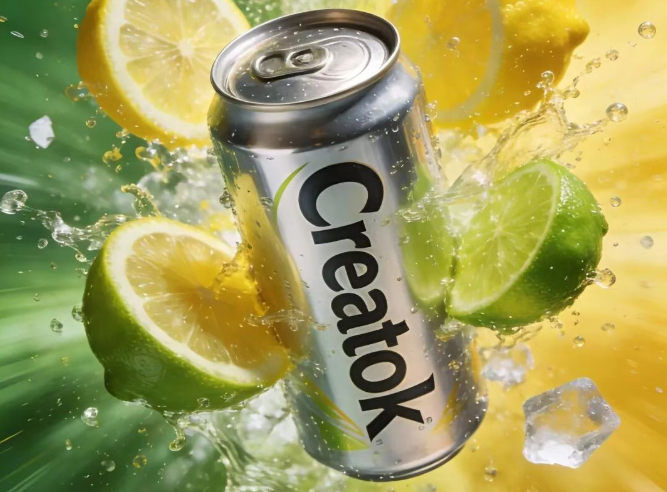
That was my honest reaction the first time I tested it seriously AI product image generator.
Using AI to generate product images is no longer new. What actually separates average results from professional-grade visuals isn’t whether you use AI — it’s whether your prompt is worth anything.
Two people can generate images using the same tool. One gets something that looks like a rough test render. The other gets a product photo that looks ready to upload.
The difference? A few carefully written sentences.
Today, let’s walk through real examples created with Creatok and break down how strong product photography prompts are structured.
Why AI Product Images Look “Amateur” or “Shelf-Ready”
Most low-quality AI product images fail for three reasons:
The product isn’t clearly defined as the focal point AI background remover
The environment feels random or disconnected
The lighting and material descriptions are vague
Professional-looking results usually follow a clear logic:
Define the subject precisely
Design the environment intentionally
Control lighting, material texture, and depth
Let’s look at practical examples.
Example 1: Apple Sparkling Wine in a Natural Forest Scene
Prompt Structure Breakdown
Scene Concept:
A bottle of apple sparkling wine placed in a dense forest environment.
Environmental Elements:
Surrounded by natural elements such as jasmine flowers, moss, and ripe apples.
Color Direction:
Premium green tone dominates the overall composition.
Depth & Reflection:
Subtle reflections and delicate water ripples appear in both foreground and background to enhance spatial depth.
Product Focus:
The bottle is precisely centered and sharply focused.
The surface features a refined frosted texture.
The label clearly displays the brand name “Creatok.”
Background Treatment:
Soft blur applied to surrounding plants and water to isolate the product.
Lighting & Style:
Natural lighting, bright and transparent.
Controlled and premium color palette.
Commercial shoot, product photography, close-up shot, minimalist style, ultra-high detail, 32K resolution.
Why This Works
The prompt:
Clearly isolates the subject
Builds atmosphere with specific natural details
Defines material texture
Controls lighting intentionally
That’s why the output looks like professional product photography rather than a generic AI image.
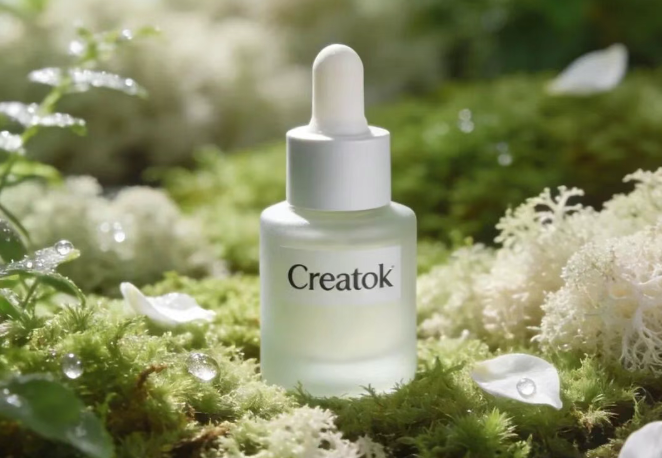
Example 2: Creatok Skincare Serum in a Calm Natural Setting
Prompt Structure Breakdown
A Creatok skincare serum placed in a quiet natural environment.
Background:
Soft green plants and light moss.
Subtle white petals and morning dew accents.
Low-saturation green and beige color scheme to convey gentleness and repair.
Product Details:
Glass bottle centered.
Premium frosted finish.
Minimalist dropper design.
Brand name “Creatok” clearly visible on the label.
Depth Enhancement:
Soft water reflections and fine ripples in the foreground.
Lighting & Tone:
Bright yet gentle natural light.
Commercial photography style.
Close-up shot.
Minimalist aesthetic.
Ultra-high definition, 32K.
Why This Feels “Luxury” Instead of “AI”
Because the prompt controls:
Emotional tone (repair, softness, calm)
Color temperature
Material texture
Foreground and background separation
It doesn’t just say “skincare product in nature.” It builds a visual narrative.
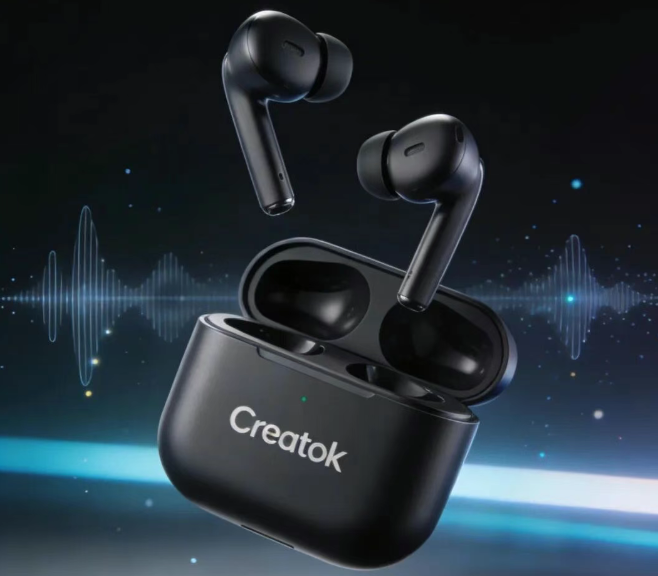
Example 3: Creatok True Wireless Earbuds – Minimal Tech Aesthetic
Prompt Structure Breakdown
A pair of Creatok true wireless Bluetooth earbuds floating at the center of the frame.
Composition:
Earbuds and charging case separated for display.
Clean, sharp lines.
Matte texture finish.
Background:
Dark gradient space.
Subtle cool light streaks and particle effects to create technological atmosphere.
Visual Accents:
Semi-transparent sound wave textures and soft glowing particles around the earbuds to imply audio quality and stable connectivity.
Branding:
“Creatok” logo clearly visible on the charging case.
Lighting:
Studio-level lighting setup.
High contrast shadows.
Realistic material rendering.
Minimalist tech style.
Ultra-high clarity.
Why It Works
Instead of saying “cool tech background,” the prompt:
Specifies gradient type
Defines light direction
Adds controlled visual effects
Maintains composition discipline
That structure makes the image feel intentional, not random.
Example 4: Creatok Portable Power Bank – Futuristic Energy Scene
Prompt Structure Breakdown
A Creatok portable power bank floating in a futuristic desktop environment.
Visual Effects:
Blue energy particles and dynamic light streaks simulating electric flow.
Material:
Metallic frosted finish with clean structural lines.
Branding:
White “Creatok” logo clearly printed on the front.
Real-Life Context:
Scattered USB cables, a laptop, and a smartwatch nearby to suggest everyday usage.
Background:
Deep blue gradient with blurred neon light bokeh and reflective surfaces for depth.
Style:
Modern, fashionable, high-tech atmosphere.
Commercial photography.
Close-up shot.
Minimalist meets contemporary design.
Why It Feels Real
It balances:
Futuristic elements
Real-life context objects
Lighting control
Texture description
That combination creates both imagination and credibility.
How to Write Better AI Product Image Prompts
Based on these examples, here are practical principles:
1. Make the Product the Clear Visual Anchor
Always define:
Position (centered, floating, angled)
Focus (sharp, isolated)
Material texture
Never assume the AI understands what to prioritize.
2.Design the Environment Intentionally
The background should:
Support the product’s identity
Reinforce emotional tone
Add depth without overpowering
A random background makes images look like test renders.
3. Control Lighting and Material Details
Specify:
Natural vs studio lighting
Contrast level
Color temperature
Surface texture (matte, frosted, metallic, glass)
Professional product photography is mostly about light and material interaction.
AI Is Not the Shortcut — Prompt Quality Is
AI image generation for e-commerce isn’t impressive anymore. What’s impressive is when the output looks indistinguishable from a studio shoot.
The real competitive gap is not whether you use AI.
It’s whether you understand:
Visual hierarchy
Lighting logic
Material realism
Composition discipline
Tools like Creatok can generate both AI-powered short-form videos and high-quality e-commerce product images. But the real leverage lies in how you instruct it.
If you experiment carefully, the efficiency feels almost unreasonable.
Feel free to share your own prompt experiments or AI tools you’ve discovered. The more we refine the craft, the better the results become.