AI Image Generator

AI Image Generator: Create High-Quality Images from Text in 2026
An AI image generator is no longer just a tool for making fun pictures from random prompts. In 2026, it has become a practical creative system for marketers, e-commerce sellers, designers, content creators, and business teams that need high-quality visuals fast.
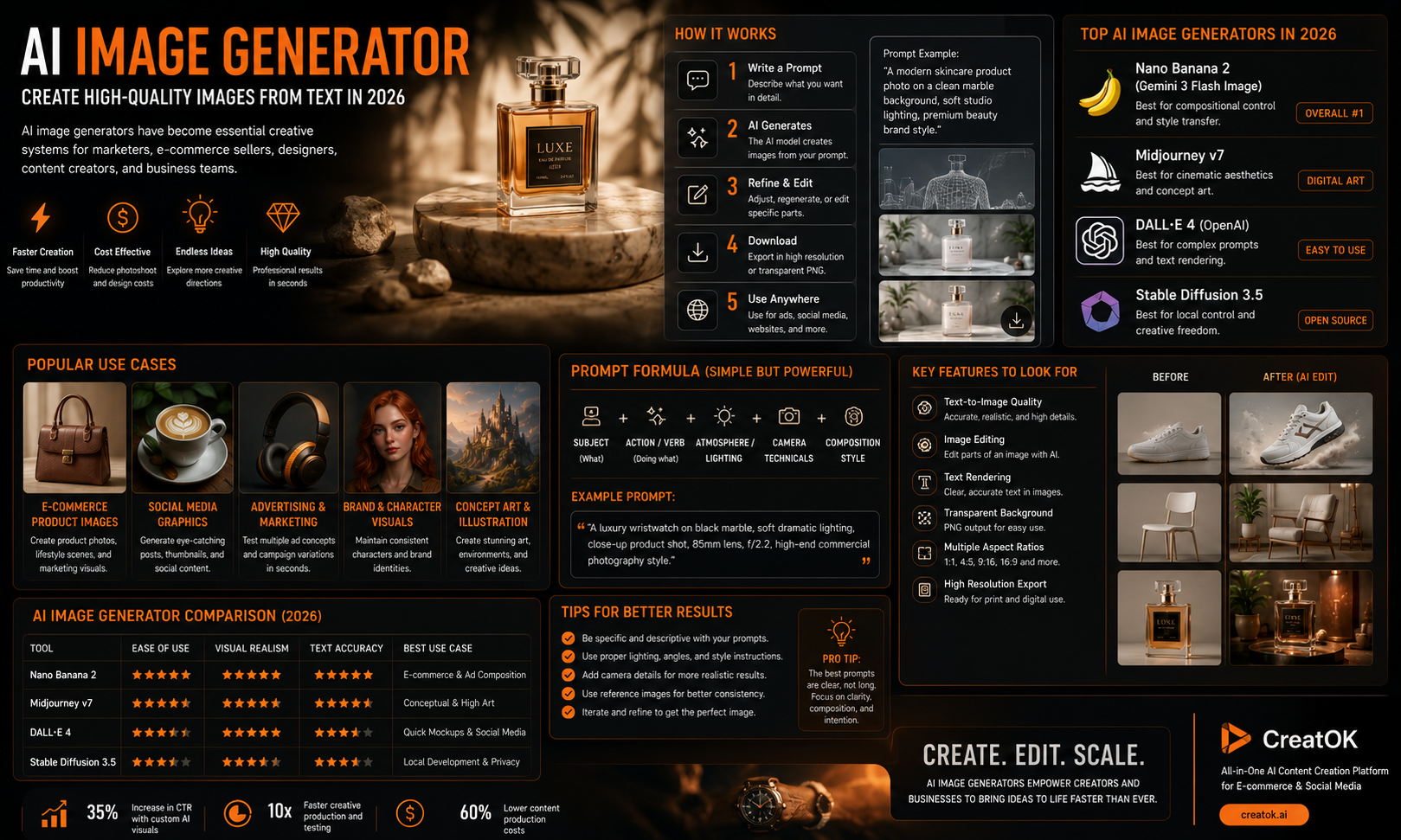
The best AI image generators can now create product photos, social media graphics, ad creatives, posters, thumbnails, concept art, character images, and brand visuals from a simple text prompt. Some tools also support image editing, transparent backgrounds, text rendering, and reference-based generation, making them far more useful than early AI art tools.
If you want to create better images with AI, this guide explains how AI image generators work, what they are best used for, how to write stronger prompts, and how to choose the right tool for your workflow.
What Is an AI Image Generator?
An AI image generator is a tool that creates images from text prompts, reference images, or both. You describe what you want, and the model generates a visual based on your instruction.
A basic prompt might be:
A modern skincare product photo on a clean marble background, soft studio lighting, premium beauty brand style.
A more advanced prompt can include camera angle, lighting, style, aspect ratio, background, typography, and brand direction.
Modern AI image generators are not limited to text-to-image. Many now support:
text to image generation
image to image generation
product background replacement
character consistency
transparent PNG output
local image editing
inpainting and outpainting
poster and ad design
multilingual text inside images
That shift is important. The real value is not just creating a pretty picture. It is creating usable visual assets for real business and content workflows.
Why AI Image Generators Matter in 2026
The demand for visual content keeps growing. Brands need more ads, more social posts, more product images, more thumbnails, more landing page visuals, and more creative variations.
Traditional design and photography still matter, but they can be slow and expensive for everyday content production. An AI image generator helps teams move faster.
For example, an e-commerce seller can test five product backgrounds before choosing one for a campaign. A content creator can generate custom blog images instead of using the same stock photos as everyone else. A marketing team can produce multiple ad concepts before sending the best one to a designer for final polish.
This is where AI image generation becomes useful: not as a replacement for taste, but as a faster way to explore, test, and produce visual ideas.
Common Use Cases for AI Image Generators
E-commerce Product Images
AI image generators are especially useful for product visuals. You can create lifestyle scenes, clean studio backgrounds, seasonal campaign images, and product hero images without arranging a full photoshoot every time.
Examples include:
skincare bottle on a luxury bathroom counter
kitchen product in a bright home setting
fashion accessory in a streetwear campaign
tech gadget on a clean desk setup
transparent product cutout for a website
For sellers, this can reduce production time and make product pages look more professional.
Social Media Graphics
Creators and brands can use AI image tools to generate visuals for Instagram, TikTok covers, Pinterest pins, YouTube thumbnails, X posts, and Facebook ads.
The key is to make the image feel platform-native. A YouTube thumbnail needs bold contrast and clear composition. A Pinterest image often needs vertical framing. A TikTok cover needs to read quickly on mobile.
Advertising and Marketing Creatives
AI image generators are useful for testing campaign concepts. Instead of waiting for one finished design, a team can create several directions quickly:
minimal product ad
bold sale poster
luxury brand visual
UGC-style product scene
seasonal campaign graphic
This makes creative testing faster and cheaper.
Brand and Character Visuals
Some AI image generators can help maintain a consistent visual identity across multiple images. This is useful for brand mascots, virtual influencers, course characters, storytelling assets, and repeat campaign visuals.
How to Write Better AI Image Prompts
Good prompts are specific, but not messy. The goal is to give the model clear creative direction.
A simple prompt formula is
AI Image Generator Features to Look For
Not every tool is built for the same job. Before choosing an AI image generator, look at these features.
Text-to-Image Quality
This is the basic ability to turn a written prompt into a strong image. Look for prompt accuracy, realism, composition, and whether the tool understands detailed instructions.
Image Editing
Image editing is where AI tools become much more useful. Instead of regenerating everything, you can modify one part of an image, change the background, remove an object, or adjust the style.
Text Rendering
Older AI image generators often struggled with text. Posters, product labels, menus, and thumbnails would come out with strange letters or broken words.
In 2026, text rendering is one of the most important features to check, especially for marketing images.
Transparent Backgrounds
Transparent PNG output is useful for product images, stickers, design assets, website elements, and ads. It saves time because you do not need to manually remove the background.
CreatOK’s GPT-Image-2 page highlights native transparent background support, multilingual text rendering, image editing, and commercial image use cases, which makes it relevant for creators who need more than simple AI art.
Aspect Ratio Options
A good tool should support multiple formats:
1:1 for square posts
4:5 for social media feeds
9:16 for TikTok and Reels
16:9 for blog headers and YouTube
transparent PNG for product and design use
Commercial Workflow
If you are using AI images for business, check whether the tool supports clean exports, high resolution, editing, and commercial usage terms.
AI Image Generator vs Stock Photos
Stock photos are easy to use, but they are often generic. Many websites use the same visuals, which makes content feel less original.
An AI image generator gives you more control. You can create an image that matches your article, product, audience, color palette, and campaign angle.
Stock photos are still useful when you need real-world authenticity. AI images are better when you need custom concepts, fast variations, or visuals that do not exist yet.
How CreatOK Fits Into the AI Image Workflow
CreatOK is best known for AI-powered TikTok e-commerce videos and viral creative workflows, but its image generation pages also make it relevant for creators who need visual assets before turning them into videos.
For example, a seller can create a polished product image first, then use that visual as a reference for a video campaign. This is a practical workflow because strong AI video often starts with a strong image.
CreatOK’s GPT-Image-2 tool is positioned for professional image generation and editing, including transparent backgrounds, multilingual text rendering, realistic portraits, and product marketing visuals. That makes it useful for creators who want to move from image creation to video production in one broader content workflow.